Walgreens Receipt Generator
Create, Customize & Download Instantly
Generate a free Walgreens receipt for pharmacy records, FSA/HSA reimbursement, or expense tracking. Our template includes Balance Rewards member numbers, points-earned and balance lines in the footer, 9-12 digit SKU codes per item, a survey code footer, and FSA/HSA Card as a payment option. Customize every field, preview live, and download as PNG or PDF.
What Does a Real Walgreens Receipt Look Like?
Walgreens receipts follow a consistent format across all 8,600+ US store locations. Here is what every section includes. Header: Store Identification. The Walgreens logo, store number (e.g., #04521), full street address, city, state, ZIP, and phone number. This identifies the specific Walgreens store location. Balance Rewards & Transaction Info. Walgreens receipts display the Balance Rewards member number, cashier name, register number, and transaction number. Points earned this trip and total available balance appear at the bottom. Itemized Products. Each item shows the SKU code, product description, quantity, and price. Tax indicator codes (T for taxable, F for food, RX/M for pharmacy items) appear next to each item price. Tax Codes & Totals. Tax indicators next to each item: T for standard taxable items, F for food/grocery items taxed at a reduced rate, and RX or M for prescription and FSA/HSA-eligible items (typically tax-exempt). Payment Method. Shows how the customer paid: Visa, Mastercard, American Express, Discover, debit card, cash with change, FSA/HSA card, or Balance Rewards points redemption. Card payments show last 4 digits. Survey Code & Footer. Most Walgreens receipts include a survey invitation with a unique code, website, and reward details. The barcode at the bottom encodes the transaction for returns and record keeping.
Sample Walgreens Receipt
The editor on this page opens with this sample Walgreens receipt. Every value can be changed before you download it.
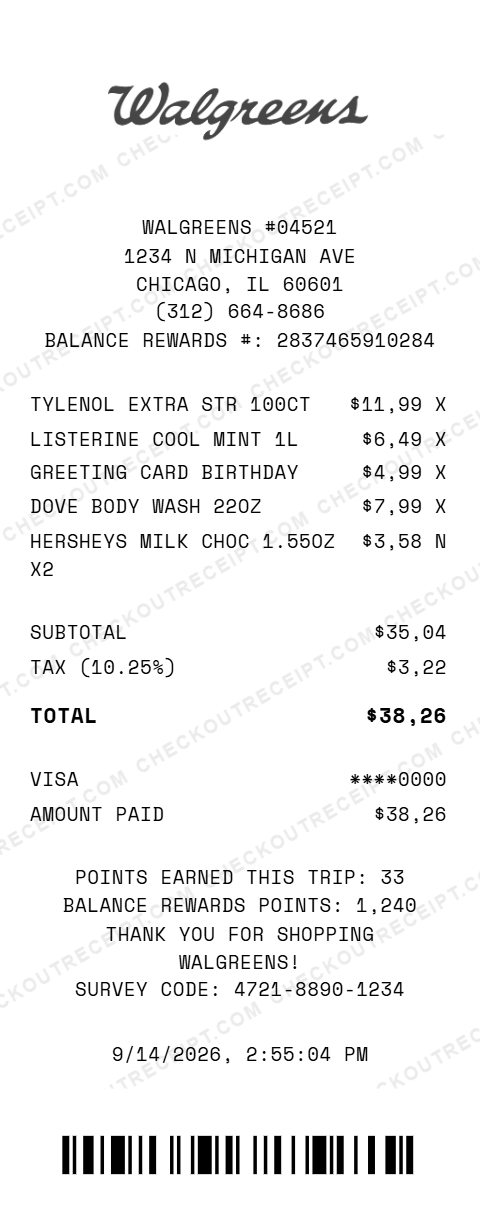
WALGREENS #04521
1234 N MICHIGAN AVE
CHICAGO, IL 60601
(312) 664-8686
BALANCE REWARDS #: 2837465910284

TYLENOL EXTRA STR 100CT         $11.99 X
LISTERINE COOL MINT 1L           $6.49 X
GREETING CARD BIRTHDAY           $4.99 X
DOVE BODY WASH 22OZ              $7.99 X
HERSHEYS MILK CHOC 1.55OZ X2     $3.58 N

SUBTOTAL                        $35.04
TAX (10.25%)                     $3.22
TOTAL                           $38.26

VISA                          ****0000
AMOUNT PAID                     $38.26
Everything You Need to Create a Realistic Walgreens Receipt
Every feature is designed to produce receipts that match authentic Walgreens formatting, from the store number to Balance Rewards points and thermal-style fonts. Matches authentic Walgreens receipt layout including store number, Balance Rewards number, SKU codes, and tax indicator codes (T, F, RX).
How It Works (3 Steps, Under 2 Minutes)
Choose your template, customize the details, and download instantly as PNG or PDF.
Sample Walgreens Receipt Items
These are examples of real item formats that appear on Walgreens receipts. Our editor uses the same SKU codes and tax indicator conventions: WAL IBUPROFEN 200MG 100CT, BAND-AID FLEX-SEAL 30CT, NIC PATCH STEP 1 7CT, AMOXICILLIN 500MG 30CT, LISINOPRIL 10MG 90CT, NEUTROGENA HYDRO BOOST, OLAY TOTAL EFFECTS SPF30, DOVE BODY WASH 22OZ, NICE! SPRING WATER 24PK, KIND BAR VARIETY 12CT, 4X6 GLOSSY PRINTS 25CT, WAL VIT D3 5000IU 100CT, FISH OIL 1200MG 90CT, COLGATE TOTAL ADV 6OZ, SUNSCREEN SPF50 8OZ, FIRST AID KIT 299PC.
Tips for Creating Realistic Walgreens Receipts
Pro tips to make your generated receipts match the real thing. Walgreens SKU codes are typically 7-digit numbers. Pharmacy items use an RX prefix followed by a longer number. Look up real products on walgreens.com to find accurate SKU codes. Real Walgreens receipts mark every item: T for taxable general merchandise and health products, F for food and grocery items, and RX or M for prescription and FSA/HSA-eligible items. This is the most important detail for realism. Every Balance Rewards member receipt shows their 12-digit member number, points earned this trip, and total points balance. Add this in the store details or custom message section. Format: BALANCE REWARDS #: 2837465910284. Most Walgreens receipts end with a survey invitation: the survey URL (survey.walgreens.com), a unique survey code, and the reward for completing it. Include a survey code like 4721-8890-1234 in the custom message. The default template uses a Chicago-area store. Illinois has a 10.25% combined sales tax rate in Chicago (6.25% state + 1.75% county + 1.25% city + 1% RTA). Use this for maximum realism with the default store address. Walgreens prices range from $2–$50 for most health and beauty items. Pharmacy generics typically run $4–$15. Nice! store brand items are priced 10–20% below national brands. Check walgreens.com for current prices.
Frequently Asked Questions
How do I use this Walgreens receipt generator?
Use the editor to enter your Walgreens store details, store number, Balance Rewards number, add items with prices and SKU codes, set a tax rate, and choose a payment method. Click PNG or PDF to download your receipt. No account or signup is required.
What does a real Walgreens receipt look like?
A real Walgreens receipt includes the Walgreens logo, store number and address, cashier name, transaction number, each item with a SKU and description, subtotal, tax, total, Balance Rewards points earned and balance, payment method, and a barcode at the bottom. Many receipts also include a survey invitation with a code for online feedback.
What are the tax codes on a Walgreens receipt?
Walgreens receipts use tax indicators next to each item: T indicates taxable items such as general merchandise and health and beauty products, F indicates food and grocery items that may be exempt or taxed at a reduced rate, and RX or M indicates prescription medications and FSA/HSA-eligible medical items which are typically tax-exempt. The tax summary at the bottom shows the total taxable amount.
What is the Balance Rewards number on a Walgreens receipt?
Balance Rewards is Walgreens loyalty program. Receipts display the member's Balance Rewards number, points earned on the current transaction, and total available points balance. Points are redeemed in $5, $10, or $25 increments. Our editor lets you enter any Balance Rewards number and adjust points displayed.
Can I customize the store location on the receipt?
Yes. You can enter any Walgreens store number, street address, city, state, ZIP code, and phone number. The default template uses a standard Walgreens store format. Walgreens has over 8,600 locations across the US.
What payment methods are available on the Walgreens receipt template?
The template supports Visa, Mastercard, American Express, Discover, debit cards, cash with change due calculation, and Balance Rewards points redemption. Walgreens also accepts FSA/HSA cards for eligible health items.
Does the receipt calculate tax automatically?
Yes. Select your state from the dropdown to auto-fill the base sales tax rate, or enter a custom rate. Tax is calculated in real-time on all taxable items marked with the T tax code. Prescription and medical items are automatically excluded from taxable totals.
Can I add prescription items to the receipt?
Yes. Add prescription items with your chosen drug name, quantity, and price. Mark them with the exempt tax code. Real Walgreens pharmacy receipts show Rx number, prescriber name, and days supply, and you can include these in the custom message section.
What file formats can I download the receipt in?
Receipts can be downloaded as PNG or PDF. Both are high-resolution and suitable for printing, emailing, or uploading to expense management software or FSA reimbursement portals.
Is this receipt generator legal to use?
This tool is designed for legitimate purposes including replacing lost receipts for actual purchases, FSA/HSA reimbursement documentation, training, design mockups, and demonstrations. Creating receipts for fraudulent purposes is illegal and prohibited.
Last updated: September 2026
Other Receipt Templates
Check out our other receipt generators: Walmart Receipt Generator, Whole Foods Market Receipt Generator, Apple Store Receipt Generator, AutoZone Receipt Generator, Balenciaga Receipt Generator, Best Buy Receipt Generator, Bulgari Receipt Generator, Burlington Receipt Generator, Cartier Receipt Generator, Chanel Receipt Generator
Pharmacy Receipt Format Guide
See the full pharmacy receipt format guide: every field explained, HSA/FSA eligibility codes, and how to document Walgreens purchases for reimbursements. Walgreens stores also handle non-prescription items in a convenience store format for snacks, drinks, and household basics.