Apple Store Receipt Generator
Create, Customize & Download Instantly
Generate a free Apple Store receipt for warranty documentation, insurance claims, or expense tracking. Our template includes part numbers (e.g., MTJV3LL/A), serial numbers, AppleCare agreement numbers, and the clean minimalist formatting Apple retail stores actually use. Customize and download instantly.
What Does a Real Apple Store Receipt Look Like?
Apple Store receipts follow a clean, minimalist format across all 500+ retail locations worldwide. Here is what every section includes. Header: Store Identification. The Apple logo, store name (e.g., Apple Fifth Avenue), full street address, city, state, ZIP, store email, phone number, and website. Apple stores use location names rather than store numbers. Transaction Codes. Apple Store receipts include the transaction date and time, customer name, customer email address, and a reference number. The customer info appears below the store header separated by dividers. Itemized Products & Services. Each item shows the product name, color, storage capacity, part number (e.g., MTJV3LL/A), and serial number. AppleCare plans appear as separate line items with agreement numbers. Tax Breakdown & Totals. Shows the subtotal, applicable tax rate and amount, and the total due. Apple products are taxable in all states with sales tax. AppleCare plans may be taxed differently depending on state law. Payment Method. Displays how the customer paid: card type with last 4 digits, Apple Card, Apple Pay, or cash. Includes transaction ID, terminal ID, reference number, and approval status. Return Policy, AppleCare & Barcode. Apple Store receipts include the 14-day return policy for most products, AppleCare coverage verification link (apple.com/support/applecare), and a scannable barcode with the transaction reference number.
Sample Apple Store Receipt
The editor on this page opens with this sample Apple Store receipt. Every value can be changed before you download it.
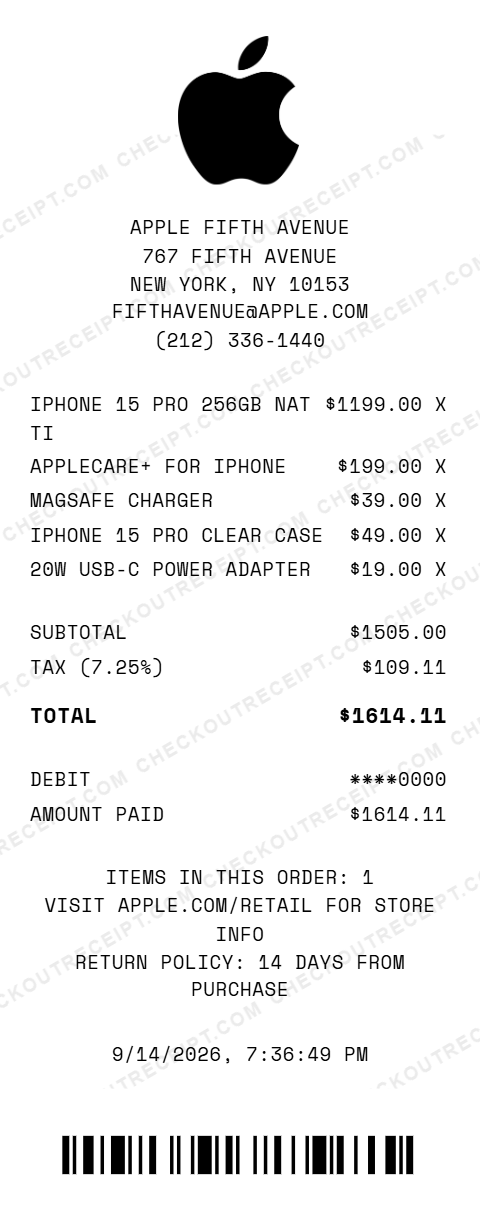
APPLE FIFTH AVENUE
767 FIFTH AVENUE
NEW YORK, NY 10153
FIFTHAVENUE@APPLE.COM
(212) 336-1440

IPHONE 15 PRO 256GB NAT TI    $1199.00 X
APPLECARE+ FOR IPHONE          $199.00 X
MAGSAFE CHARGER                 $39.00 X
IPHONE 15 PRO CLEAR CASE        $49.00 X
20W USB-C POWER ADAPTER         $19.00 X

SUBTOTAL                      $1505.00
TAX (7.25%)                    $109.11
TOTAL                         $1614.11

DEBIT                         ****0000
AMOUNT PAID                   $1614.11
Everything You Need to Create a Realistic Apple Store Receipt
Every feature is designed to produce receipts that match authentic Apple Store formatting, from the store name to the clean minimalist layout. Matches authentic Apple Store receipt layout including store name, part numbers, serial numbers, and section dividers.
How It Works (3 Steps, Under 2 Minutes)
Choose your template, customize the details, and download instantly as PNG or PDF.
Sample Apple Store Receipt Items
These are examples of real item formats that appear on Apple Store receipts. Our editor uses the same formatting conventions: IPHONE 15 PRO 256GB NAT TI, IPHONE 15 128GB BLUE, MACBOOK AIR 15 M3 256GB, MACBOOK PRO 14 M3 PRO 512GB, IPAD AIR M2 11IN 128GB, IPAD 10TH GEN 64GB BLUE, APPLE WATCH SERIES 9 45MM, AIRPODS PRO 2ND GEN USB-C, AIRPODS MAX SILVER, APPLECARE+ FOR IPHONE, APPLECARE+ FOR MACBOOK, MAGSAFE CHARGER, 20W USB-C POWER ADAPTER, IPHONE 15 PRO CLEAR CASE, MAGIC KEYBOARD W TOUCH ID, APPLE PENCIL 2ND GEN.
Tips for Creating Realistic Apple Store Receipts
Pro tips to make your generated receipts match the real thing. Look up actual part numbers on apple.com. Apple part numbers follow the format XXXXX/LL/A (e.g., MTJV3LL/A for iPhone 15 Pro). Part numbers are 5–6 digits and include the brand prefix (e.g., MTJV3LL/A for iPhone 15 Pro, MHXH3AM/A for MagSafe Charger). Real Apple receipts include serial numbers for every device purchased. Add these in the custom message section or item description for authenticity. Apple Store receipts use mixed case product names with model details. Include color, storage capacity, and chip variant (e.g., iPhone 15 Pro 256GB Natural Titanium). AppleCare+ plans appear as separate line items on Apple receipts with their own part number, serial number, and agreement number. Real Apple receipts include a transaction ID, terminal ID, reference number, and approval status. These details add significant authenticity. Check apple.com for current pricing on iPhones, MacBooks, iPads, and accessories. Apple prices are consistent nationwide but tax varies by state and locality.
Frequently Asked Questions
How do I use this Apple Store receipt generator?
Use the editor to enter your Apple Store location details, add products with prices and part numbers, set a tax rate, and choose a payment method. Click PNG or PDF to download your receipt. No account or signup is required.
What does a real Apple Store receipt look like?
A real Apple Store receipt includes the Apple logo, store name and address, store email and phone, customer name and email, each item with part number and serial number, AppleCare details with agreement number, subtotal, tax, total, payment method with reference number, and a return policy notice.
Do Apple Store receipts include serial numbers?
Yes. Apple Store receipts list the part number (e.g., MTJV3LL/A) and serial number for each device purchased. AppleCare plans also show their own serial number and agreement number. These are essential for warranty claims and device registration.
Can I customize the store location on the receipt?
Yes. You can enter any Apple Store name, street address, city, state, ZIP code, phone number, and store email. The default template uses the Apple Fifth Avenue store format.
What payment methods are available on the Apple receipt template?
The template supports Visa, Mastercard, American Express, Discover, Apple Card, Apple Pay, debit cards, and cash with change due calculation.
Does the receipt calculate tax automatically?
Yes. Select your state from the dropdown to auto-fill the base sales tax rate, or enter a custom rate. Tax is calculated in real-time on all taxable items.
What products can I add to an Apple receipt?
You can add any Apple product including iPhones, MacBooks, iPads, Apple Watches, AirPods, accessories, AppleCare plans, and trade-in credits. Each item supports part numbers, serial numbers, and custom descriptions.
How does AppleCare appear on Apple receipts?
AppleCare+ appears as a separate line item with its own part number, serial number, and agreement number. The receipt notes that the plan is registered automatically and includes a link to verify coverage.
What file formats can I download the receipt in?
Receipts can be downloaded as PNG (image) or PDF (document). Both are high-resolution and suitable for printing, emailing, or uploading to expense management software.
Is this receipt generator legal to use?
This tool is designed for legitimate purposes including replacing lost receipts for actual purchases, training, design mockups, and demonstrations. Creating false receipts for fraudulent purposes is illegal and prohibited.
Last updated: September 2026
Other Receipt Templates
Check out our other receipt generators: AutoZone Receipt Generator, Balenciaga Receipt Generator, Best Buy Receipt Generator, Bulgari Receipt Generator, Burlington Receipt Generator, Cartier Receipt Generator, Chanel Receipt Generator, Chick-fil-A Receipt Generator, Christian Dior Receipt Generator, Costco Receipt Generator
Electronics Receipt Format Guide
See the full electronics store receipt format guide: every field explained, serial numbers, warranty tracking, and how to document Apple Store purchases for insurance and expense records.