Best Buy Receipt Generator
Create, Customize & Download Instantly
Create a free Best Buy electronics receipt with 7-digit SKU numbers matching real bestbuy.com format (e.g. 6501234, 8823401), verbose product descriptions (SAMSUNG 65IN QLED TV, HDMI CABLE 6FT 4K), Geek Squad Protection plan line items (GS PROTECTION 2YR, GS TECH SUPPORT 1YR), and My Best Buy member numbers with Elite/Elite Plus loyalty tiers. Ideal for warranty records, electronics returns, or insurance documentation.
What Does a Real Best Buy Receipt Look Like?
Best Buy receipts follow a consistent format across all 1,100+ US store locations. Here is what every section includes. Header: Store Identification. The Best Buy logo, store number (e.g., #0443), full street address, city, state, ZIP, and phone number. This identifies the specific Best Buy store location. Cashier & Transaction Info. Best Buy receipts display the cashier name, register number, and a unique transaction ID. My Best Buy member numbers appear when the loyalty account is linked at checkout. Itemized Products. Each item shows the SKU number, product description, quantity, and price. Geek Squad protection plans appear as separate line items with their own SKUs. Items are listed with full product descriptions. Tax & Totals. Subtotal, tax amount, and total are clearly displayed. Electronics are taxable in all states. Tax is calculated on the full item price including any discounts applied. Payment Method. Shows how the customer paid: Visa, Mastercard, Amex, Discover, debit, Best Buy Credit Card, Best Buy gift card, or PayPal. Card payments show last 4 digits and authorization code. Return Policy & Footer. Every Best Buy receipt includes the return policy window (15 days standard, 30 days for Elite, 45 days for Elite Plus). A barcode and transaction number appear at the bottom for returns and exchanges.
Sample Best Buy Receipt
The editor on this page opens with this sample Best Buy receipt. Every value can be changed before you download it.
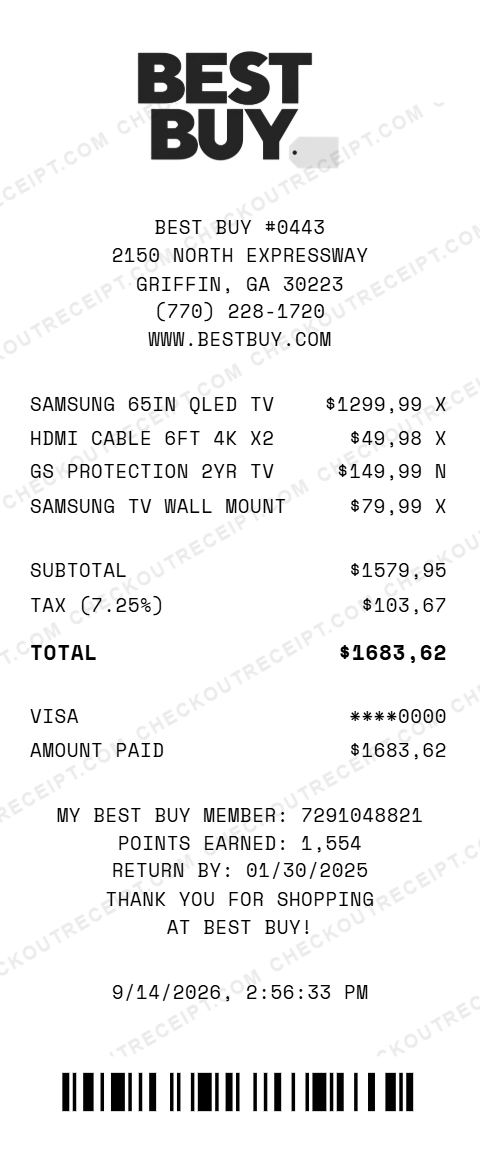
BEST BUY #0443
2150 NORTH EXPRESSWAY
GRIFFIN, GA 30223
(770) 228-1720
WWW.BESTBUY.COM

SAMSUNG 65IN QLED TV         $1,299.99 X
HDMI CABLE 6FT 4K X2            $49.98 X
GS PROTECTION 2YR TV           $149.99 N
SAMSUNG TV WALL MOUNT           $79.99 X

SUBTOTAL                     $1,579.95
TAX (7.25%)                    $103.67
TOTAL                        $1,683.62

VISA                          ****0000
AMOUNT PAID                  $1,683.62
Everything You Need to Create a Realistic Best Buy Receipt
Every feature is designed to produce receipts that match authentic Best Buy formatting, from the store number to SKU numbers and Geek Squad items. Matches authentic Best Buy receipt layout including store number, SKU numbers, Geek Squad items, and Best Buy receipt layout.
How It Works (3 Steps, Under 2 Minutes)
Choose your template, customize the details, and download instantly as PNG or PDF.
Sample Best Buy Receipt Items
These are examples of real item formats that appear on Best Buy receipts. Our editor uses the same SKU and formatting conventions: SAMSUNG 65IN QLED 4K SMART TV, LG 55IN OLED EVO C3 SERIES, SONY WH-1000XM5 HEADPHONES, APPLE AIRPODS PRO 2ND GEN, APPLE MACBOOK AIR M2 13IN, LOGITECH MX MASTER 3S MOUSE, APPLE IPHONE 16 PRO 128GB, SAMSUNG GALAXY S25 ULTRA, SONY PLAYSTATION 5 SLIM, XBOX WIRELESS CONTROLLER, SONY A7 IV MIRRORLESS CAMERA, INSTANT POT DUO 7-IN-1 8QT, GS PROTECTION PLAN 2YR TV, GS TECH SUPPORT 1YR, SAMSUNG 65IN TILTING MOUNT, AMAZON FIRE TV STICK 4K MAX.
Tips for Creating Realistic Best Buy Receipts
Pro tips to make your generated receipts match the real thing. Look up actual SKU numbers on bestbuy.com. Every product page shows the SKU in the product details section. Best Buy SKUs are typically 7 digits. Geek Squad plans appear as separate line items on real receipts. Use the format 'GS PROTECTION [X]YR [PRODUCT TYPE]' with a 7-digit SKU starting with 99. Best Buy receipts use ALL CAPS for item descriptions. Long product names are abbreviated: SAMSUNG 65IN QLED 4K SMART TV rather than the full marketing name. My Best Buy member numbers are 10 digits. Include this in the custom message section with points earned to add realism. Format: MY BEST BUY MEMBER: 7291048821. Best Buy receipts print the return deadline based on your membership tier. Standard is 15 days, Elite is 30 days, Elite Plus is 45 days. Add 'RETURN BY: [DATE]' in the footer message. Best Buy transaction IDs follow a specific format: [4 digits]-[store number]-[date]-[sequence]. Example: 7291-0443-20250115-001. Using this format significantly increases realism.
Frequently Asked Questions
How do I use this Best Buy receipt generator?
Use the editor to enter your Best Buy store details, add items with SKU numbers and prices, set a tax rate, and choose a payment method. Click PNG or PDF to download your receipt. No account or signup is required.
What does a real Best Buy receipt look like?
A real Best Buy receipt includes the Best Buy logo, store number and address, cashier name, register number, transaction ID, each item with a SKU number and description, subtotal, tax, total, payment method with last 4 digits, and a return policy notice. My Best Buy member numbers may also appear.
What is a SKU number on a Best Buy receipt?
SKU (Stock Keeping Unit) is a 6–7 digit identifier unique to each product. Every item sold at Best Buy has a unique SKU that appears on the receipt. You can look up Best Buy SKUs on their website under each product listing.
Can I add Geek Squad protection plans to the receipt?
Yes. Geek Squad protection plans appear as line items on Best Buy receipts, typically listed as 'Geek Squad Protection [X]yr' with their own SKU number. You can add these as any regular line item.
What payment methods does Best Buy accept?
Best Buy accepts Visa, Mastercard, American Express, Discover, debit cards, Best Buy Credit Card, Best Buy gift cards, and PayPal. Our template supports all of these payment options.
What is the Best Buy return policy shown on the receipt?
Standard Best Buy return policy is 15 days for most items. My Best Buy Elite members get 30 days, and Elite Plus members get 45 days. The return policy is printed on every Best Buy receipt.
What is a My Best Buy member number?
My Best Buy is Best Buy's loyalty rewards program. Members earn points on purchases and get extended return windows. The member number is a 10-digit number printed on the receipt when the member is identified at checkout.
Does the receipt calculate tax automatically?
Yes. Select your state from the dropdown to auto-fill the base sales tax rate, or enter a custom rate. Tax is calculated in real-time on all taxable items.
What file formats can I download the receipt in?
Receipts can be downloaded as PNG (image) or PDF (document). Both are high-resolution and suitable for printing, emailing, or uploading to expense management software.
Is this Best Buy receipt generator legal to use?
This tool is designed for legitimate purposes including replacing lost receipts for actual purchases, training, design mockups, and demonstrations. Creating false receipts for fraudulent purposes is illegal and prohibited.
Last updated: September 2026
Other Receipt Templates
Check out our other receipt generators: Bulgari Receipt Generator, Burlington Receipt Generator, Cartier Receipt Generator, Chanel Receipt Generator, Chick-fil-A Receipt Generator, Christian Dior Receipt Generator, Costco Receipt Generator, CVS Pharmacy Receipt Generator, Dunkin' Donuts Receipt Generator, GOAT Receipt Generator
Electronics Store Receipt Format Guide
See the full electronics store receipt format guide: every field explained, warranty plan documentation, and how to document Best Buy purchases for expense reports.