Dunkin' Donuts Receipt Generator
Create, Customize & Download Instantly
Generate a free Dunkin' receipt with size-prefixed item names (MED ICED COFFEE, LG HOT COFFEE), authentic SML/MED/LG sizing format, Dunkin' Card as a payment option, and the real www.DunkinBaskinRunsOnYou.com survey footer with validation code field. Perfect for cafe expense records, breakfast meal tracking, or personal coffee-run bookkeeping. Customize the order and download in seconds.
What Does a Real Dunkin' Donuts Receipt Look Like?
A real Dunkin' Donuts receipt follows a specific thermal printer format. At the top you'll find the Dunkin' logo and six-digit store number with the full address and phone number. Below that is the cashier name or number, register number, date/time stamp, and order number. The item section lists each product in ALL CAPS: coffee drinks show the size and any customizations (cream, sugar, flavor shots). Donuts, bagels, and breakfast sandwiches each appear as separate line items with price. The bottom section shows the subtotal, applicable sales tax, total, payment method (cash, credit, debit, or Dunkin' Card), and the DunkinBaskinRunsOnYou.com survey invitation with a validation code for a free classic donut.
Sample Dunkin' Donuts Receipt
The editor on this page opens with this sample Dunkin' Donuts receipt. Every value can be changed before you download it.
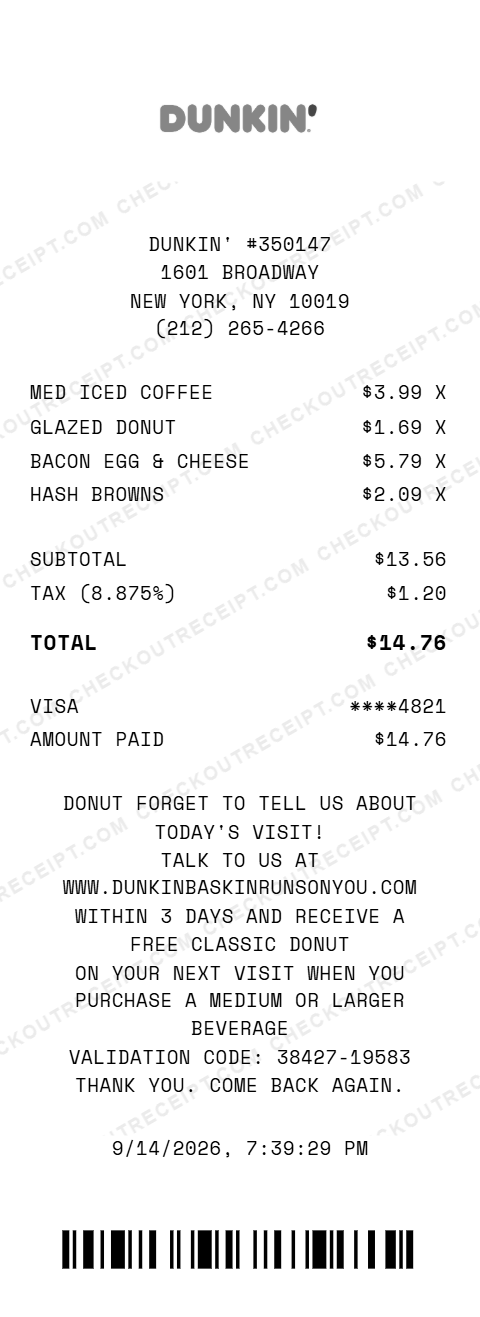
DUNKIN' #350147
1601 BROADWAY
NEW YORK, NY 10019
(212) 265-4266

MED ICED COFFEE                  $3.99 X
GLAZED DONUT                     $1.69 X
BACON EGG & CHEESE               $5.79 X
HASH BROWNS                      $2.09 X

SUBTOTAL                        $13.56
TAX (8.875%)                     $1.20
TOTAL                           $14.76

VISA                          ****4821
AMOUNT PAID                     $14.76
Everything You Need to Create a Realistic Dunkin' Donuts Receipt
Every feature is designed to produce receipts that match authentic Dunkin' formatting. Customize the store number, address, cashier, register, and order number. Add any combination of hot and iced coffees, espresso drinks, donuts, muffins, bagels, breakfast sandwiches, wraps, hash browns, and beverages. Set payment type to cash with change due, credit card, debit card, or Dunkin' Card. Include the survey invitation with custom validation code. Download as PNG or PDF.
How It Works (3 Steps, Under 2 Minutes)
Choose your template, customize the details, and download instantly as PNG or PDF.
Sample Dunkin' Donuts Receipt Items
These are examples of real item formats that appear on Dunkin' Donuts receipts.
Tips for Creating Realistic Dunkin' Donuts Receipts
Pro tips to make your generated receipts match the real thing.
Frequently Asked Questions
What items can I add to a Dunkin' Donuts receipt?
You can add any Dunkin' menu item including hot and iced coffee in all sizes (Small, Medium, Large, Extra Large), espresso drinks like lattes and cappuccinos, frozen drinks, refreshers, donuts (classic, filled, specialty), muffins, bagels with cream cheese, breakfast sandwiches, wraps, hash browns, Munchkins donut holes, cookies, and bottled beverages.
Does the receipt include the DunkinBaskinRunsOnYou.com survey footer?
Yes. The default template includes the real Dunkin' survey footer with the DunkinBaskinRunsOnYou.com URL, a validation code, and the free classic donut offer message. Dunkin' Card is also available as a payment method. Both match what appears on real Dunkin' receipts.
Can I customize the store location and details?
Yes. Edit the store number (six-digit format), store name, address, city, state, ZIP code, and phone number. You can match any of the 13,000+ Dunkin' locations across the United States.
How does the tax calculation work?
Enter your local sales tax rate or select your state to auto-fill. Tax rules vary by state, as in some states coffee is taxed differently than food items. The generator calculates tax on the subtotal and displays it as a separate line.
What payment methods are supported?
The editor supports Cash (with Amount Tendered and Change Due), Visa, Mastercard, American Express, Discover, Debit Card, and Dunkin' Card. For card payments, enter the last 4 digits of the card number.
Can I add the survey invitation to the receipt?
Yes. Real Dunkin' receipts include a survey invitation to DunkinBaskinRunsOnYou.com with a validation code. Complete the survey within 3 days of your visit to receive a free classic donut with the purchase of a medium or larger beverage. The editor lets you customize the survey URL and validation code.
What does the order number format look like?
Dunkin' receipts display an order number that is called when your order is ready for pickup. The format is typically a 3-digit number. The receipt also shows the register number and cashier ID or name.
Can I add drink size prefixes and item variations?
Yes. Item descriptions support size prefixes (SML, MED, LG) matching real Dunkin' naming conventions, for example MED ICED COFFEE or LG HOT COFFEE. You can also write any variation into the item description field, or add a separate line item for add-ons you need to document.
What file formats can I download the receipt in?
Receipts can be downloaded as PNG (image) or PDF (document). Both are high-resolution and suitable for printing, emailing, or uploading to expense management software.
Is this receipt generator legal to use?
This tool is designed for legitimate purposes including replacing lost receipts for actual purchases, training, design mockups, and demonstrations. Creating false receipts for fraudulent purposes is illegal and prohibited.
Last updated: September 2026
Other Receipt Templates
Check out our other receipt generators: GOAT Receipt Generator, Gucci Receipt Generator, Hermes Receipt Generator, Home Depot Receipt Generator, Kroger Receipt Generator, Louis Vuitton Receipt Generator, Lowe's Receipt Generator, Macy's Receipt Generator, Marshalls Receipt Generator, McDonald's Receipt Generator
Fast Food Receipt Format Guide
See the full fast food receipt format guide - every field explained, tip and tax treatment by state, and how to document Dunkin' Donuts purchases for expense reports.
Cafe Receipt Format Guide
See the full Cafe Receipt Format Guide for drink modifier pricing, loyalty credits, and how cafe receipts handle tip and tax.