Kroger Receipt Generator
Create, Customize & Download Instantly
Generate a free Kroger receipt for grocery purchase records, expense tracking, or training materials. Kroger is the largest supermarket chain in the US, operating 2,700+ stores under banners including Kroger, Ralphs, Fred Meyer, Harris Teeter, and King Soopers. Our template includes the Kroger logo, store number and address, cashier ID, itemized products with tax codes, Kroger Plus Card savings, digital coupons, fuel points, pricing, sales tax, and payment method. Customize and download instantly.
What Does a Real Kroger Receipt Look Like?
A Kroger receipt follows a standard supermarket POS format. The receipt begins with the Kroger logo, followed by the store number, address, and phone number. The cashier name or ID appears next. Each product is listed with its name, UPC code, price, and a tax code (T for taxable, F for food/exempt). Kroger Plus Card savings, digital coupons, subtotal, sales tax, total, payment method, fuel points earned, and fuel points balance complete the receipt.
Sample Kroger Receipt
The editor on this page opens with this sample Kroger receipt. Every value can be changed before you download it.
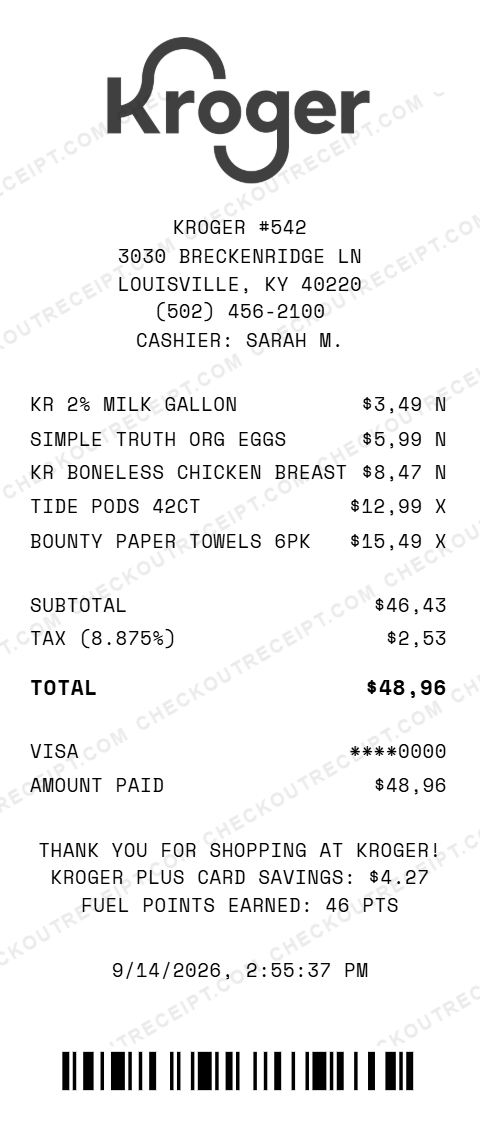
KROGER #542
3030 BRECKENRIDGE LN
LOUISVILLE, KY 40220
(502) 456-2100
CASHIER: SARAH M.

KR 2% MILK GALLON                $3.49 N
SIMPLE TRUTH ORG EGGS            $5.99 N
KR BONELESS CHICKEN BREAST       $8.47 N
TIDE PODS 42CT                  $12.99 X
BOUNTY PAPER TOWELS 6PK         $15.49 X

SUBTOTAL                        $46.43
TAX (8.875%)                     $2.53
TOTAL                           $48.96

VISA                          ****0000
AMOUNT PAID                     $48.96
Everything You Need to Create a Realistic Kroger Receipt
Every feature is designed to produce receipts that match authentic Kroger POS formatting, from the tax codes to the Plus Card savings. Matches the Kroger store receipt layout including store number, cashier ID, itemized groceries with tax codes, Plus Card savings, and fuel points.
How It Works (3 Steps, Under 2 Minutes)
Choose the Kroger template, customize the grocery details, and download instantly as PNG or PDF.
Sample Kroger Product Details
These are examples of real product formats that appear on Kroger receipts. Kroger 2% Milk Gallon ($3.49 F), Simple Truth Organic Eggs ($5.99 F), Kroger Boneless Chicken Breast ($8.47 F), Tide Pods 42ct ($12.99 T), Bounty Paper Towels 6pk ($15.49 T), Kroger White Bread ($2.29 F), Banana per lb ($0.59 F), Kroger Cheddar Cheese 8oz ($3.29 F).
Tips for Creating Realistic Kroger Receipts
Use the T/F tax codes for each item. Include Kroger Plus Card savings as negative line items. Add fuel points earned. Include the store number. List digital coupon savings separately from sale prices.
Kroger Receipt vs Other Grocery Stores
Kroger receipts use the T/F tax code system with Kroger Plus Card savings and fuel points. Walmart receipts use N/X/O tax codes with Walmart+ savings. Publix receipts feature BOGO deals. Whole Foods receipts show Amazon Prime savings. Each grocery chain has a distinctive receipt format.
Frequently Asked Questions
How do I use this Kroger receipt generator?
Use the editor to enter the store location, cashier ID, grocery items with prices and tax codes, Kroger Plus Card savings, tax rate, and payment method. Click PNG or PDF to download your receipt. No account or signup is required.
What does a real Kroger receipt look like?
A Kroger receipt includes the Kroger logo, the store number and address, the cashier name or ID, itemized products with UPC codes, per-item tax codes (T for taxable, F for food/non-taxable), Kroger Plus Card savings, digital coupon savings, subtotal, sales tax, total, payment method, date and time, and fuel points earned.
What are Kroger tax codes and how do they work?
Kroger uses letter codes next to each item price: T means the item is taxable (non-food items like cleaning supplies, paper goods), F means food and is tax-exempt in most states. Some states tax groceries, so the code behavior varies by location. Our editor lets you set the tax code per item.
What is the Kroger Plus Card and how does it appear on receipts?
The Kroger Plus Card is a free loyalty card that gives members sale prices, digital coupons, and fuel points. On receipts, the card number appears near the top, sale savings show as a negative line per item or as a total SAVINGS line, and fuel points earned are listed at the bottom.
Does Kroger charge sales tax on groceries?
Kroger charges sales tax based on the store's state and local rates. Most states exempt unprepared food (groceries) from sales tax, but non-food items (cleaning supplies, paper goods, toiletries) are taxable. Some states like Mississippi and Alabama tax groceries. Our editor lets you select a state or enter a custom rate.
What payment methods does Kroger accept?
Kroger accepts Visa, Mastercard, American Express, Discover, debit cards, cash, EBT/SNAP, Kroger Pay (mobile), personal checks, and Kroger gift cards. Our template supports all major card types with the last 4 digits displayed.
How are Kroger fuel points shown on receipts?
Kroger fuel points are earned on most purchases (1 point per dollar, 2x on gift cards). The receipt shows points earned on the current transaction, total points balance, and the expiration date. Points are redeemable for fuel discounts at Kroger fuel centers and Shell stations.
How are digital coupons shown on Kroger receipts?
Digital coupons loaded to the Kroger Plus Card automatically apply at checkout. On the receipt, each digital coupon appears as a separate savings line below the item it applies to, showing the coupon description and discount amount.
Can I use this for expense tracking?
This tool is designed for legitimate purposes including replacing lost receipts for actual purchases, expense tracking, training materials, and design mockups. Creating false receipts for fraud is illegal and prohibited. CheckoutReceipt is not affiliated with, endorsed by, or sponsored by Kroger.
What makes a Kroger receipt different from other grocery stores?
Kroger receipts are distinctive for the Kroger logo, the Kroger Plus Card savings breakdown, fuel points earned and balance, digital coupon line items, and the T/F tax code system. Kroger is the largest supermarket chain in the US by revenue, operating under banners including Kroger, Ralphs, Fred Meyer, Harris Teeter, and King Soopers.
Last updated: September 2026
Other Receipt Templates
Check out our other receipt generators: Louis Vuitton Receipt Generator, Lowe's Receipt Generator, Macy's Receipt Generator, Marshalls Receipt Generator, McDonald's Receipt Generator, Nike Receipt Generator, Prada Receipt Generator, Publix Receipt Generator, Rolex Receipt Generator, Ross Dress For Less Receipt Generator
Grocery Receipt Format Guide
See the full grocery receipt format guide: every field explained, how supermarkets structure receipts, and how to document grocery purchases for expense reports and budgets.