Lowe's Receipt Generator
Create, Customize & Download Instantly
Generate a free Lowe's home improvement receipt for project records, contractor billing, or expense tracking. Our template includes 9-10 digit SKU numbers per item, authentic ALL CAPS abbreviated descriptions (2X4X8 WHITEWOOD STUD, SHARKBITE PUSH-TO-CONNECT ELBOW), per-item N/X/O tax codes, the 'Do it right for less' footer with 90-day return policy, and Lowe's Advantage Card, Business Account, or Gift Card payment options. Customize and download instantly.
What's on a Real Lowe's Receipt?
Lowe's receipts follow a consistent format across all 1,700+ US store locations. Here is what every section includes. Header: Store Identification. The Lowe's logo, store number (e.g., #0487), full street address, city, state, ZIP, and phone number. This identifies the exact Lowe's store where the purchase was made. Cashier & Transaction Info. Lowe's receipts display the cashier name, register number, and a unique transaction number (also called order number or PO number). This number is required for returns and price match requests. Itemized Products with SKUs. Each item shows the Lowe's SKU number (6–9 digits), full product description in uppercase, quantity, unit price, and line total. Special orders show order numbers alongside SKUs. Tax & Totals. Subtotal, state sales tax amount, and total are clearly displayed. Most hardware and building materials are taxable. Certain states may exempt specific tool categories. Tax rate is applied to the subtotal. Payment Method. Shows how the customer paid: Visa, Mastercard, Amex, Discover, debit, Lowe's Advantage Card, Lowe's Business Account, gift card, or cash. Card payments show last 4 digits and approval code. Return Policy & Barcode. Every Lowe's receipt shows the return policy (90 days for most items, 30 days for outdoor power equipment and tools). A scannable barcode appears at the bottom for returns, exchanges, and price match verification.
Sample Lowe's Receipt
The editor on this page opens with this sample Lowe's receipt. Every value can be changed before you download it.
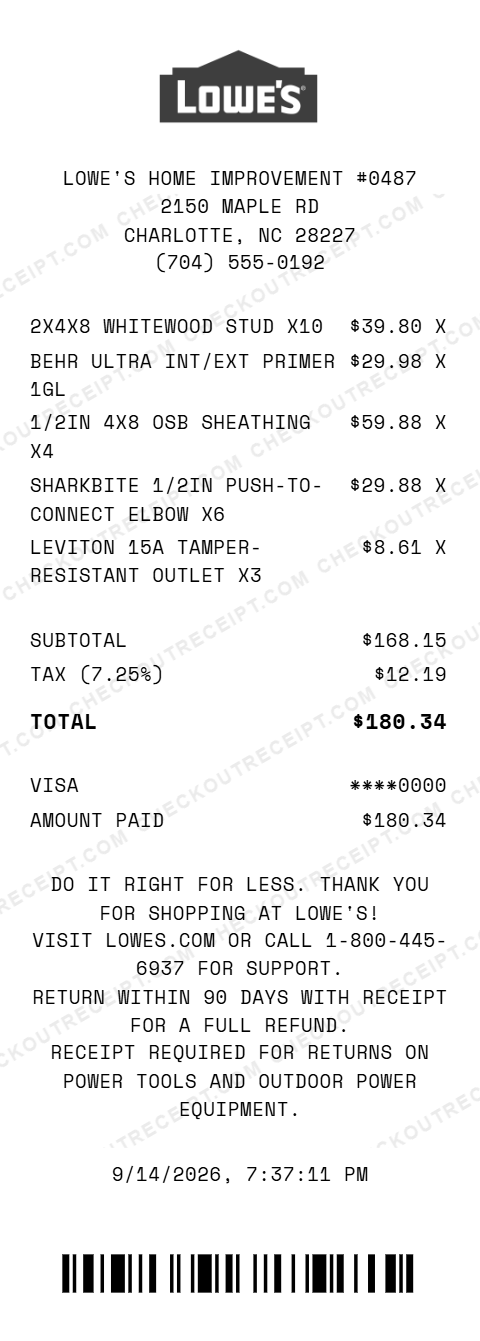
LOWE'S HOME IMPROVEMENT #0487
2150 MAPLE RD
CHARLOTTE, NC 28227
(704) 555-0192

2X4X8 WHITEWOOD STUD X10                  $39.80 X
BEHR ULTRA INT/EXT PRIMER 1GL             $29.98 X
1/2IN 4X8 OSB SHEATHING X4                $59.88 X
SHARKBITE 1/2IN PUSH-TO-CONNECT ELBOW X6  $29.88 X
LEVITON 15A TAMPER-RESISTANT OUTLET X3     $8.61 X

SUBTOTAL                                 $168.15
TAX (7.25%)                               $12.19
TOTAL                                    $180.34

VISA                                    ****0000
AMOUNT PAID                              $180.34
Everything You Need to Create a Realistic Lowe's Receipt
Every feature is designed to produce receipts that match authentic Lowe's formatting, from the store number and SKUs to thermal-style fonts. Matches authentic Lowe's receipt layout including store number, SKU numbers, cashier name, and transaction number.
How It Works (3 Steps, Under 2 Minutes)
Choose your template, customize the details, and download instantly as PNG or PDF.
Sample Lowe's Receipt Items
These are examples of real item formats that appear on Lowe's receipts. Our editor uses the same SKU and formatting conventions: 2X4X8 WHITEWOOD STUD, 2X6X12 #2 PRIME SPF LUMBER, 3/4IN 4X8 PLYWOOD SHEATHING, 1/2IN 4X8 DRYWALL PANEL, BEHR ULTRA INT/EXT PRIMER 1GL, PURDY 2IN XL GLIDE BRUSH, SHARKBITE 1/2IN PTC ELBOW, DELTA FAUCET CARTRIDGE REPL, ROMEX 14/2 NM-B WIRE 250FT, LEVITON 15A TR OUTLET WHITE, LB 16D COMMON NAIL, GE SILICONE II CLEAR 10.1OZ, KOBALT 25FT TAPE MEASURE, DEWALT 20V MAX DRILL KIT, SCOTTS TURF BUILDER 12.6LB, QUIKRETE 80LB CONCRETE MIX.
Tips for Creating Realistic Lowe's Receipts
Make your generated receipts match the authentic Lowe's format with these tips. Lowe's SKUs are 6–9 digit numbers. Look up actual SKUs on lowes.com by searching any product: the number appears in the URL and on the product page. Using real SKUs makes your receipt far more convincing. Lowe's prints product descriptions in uppercase. Include abbreviations like IN (inch), FT (feet), GL (gallon), LB (pound), and common trade terms like NM-B (Romex wire), OSB (oriented strand board), and SPF (spruce-pine-fir). Sales tax on building materials varies by state. Select your state from the dropdown for an accurate rate. Contractor-grade purchases in some states may qualify for exemptions; enter a custom rate if needed. Lowe's transaction numbers are typically 10-digit numeric strings. Generate a random 10-digit number for an authentic look. This number also appears in the barcode at the bottom of the receipt. Lowe's Pro purchases often include case pricing, pallet quantities, and special order items. Add a line item labeled 'SPECIAL ORDER' with a custom SKU to replicate bulk contractor purchases. Lowe's accepts Visa, Mastercard, Amex, Discover, debit, Lowe's Advantage Card, Lowe's Business Account, and gift cards. Lowe's does not accept PayPal or Apple Pay in most stores. Match this for accuracy.
Frequently Asked Questions
How do I use this Lowe's receipt generator?
Use the editor to enter your Lowe's store number and address, add items with SKU numbers and prices, set a state tax rate, and choose a payment method. Click PNG or PDF to download your receipt. No account or signup is required.
What does a real Lowe's receipt look like?
A real Lowe's receipt includes the Lowe's logo, store number and address, transaction number, cashier name, each item with a SKU number and full product description, subtotal, tax, total, payment method with last 4 digits, and a barcode at the bottom for returns. Our template replicates all of these elements.
What are Lowe's item SKU numbers?
Lowe's uses a 6–9 digit SKU system to identify every product. SKUs appear on shelf tags, product pages, and receipts. Common Lowe's SKU formats range from 6-digit hardware codes (e.g., 123456) to 9-digit product identifiers (e.g., 5013820017). Our editor lets you enter any SKU to match your purchase.
Can I customize the store location on the Lowe's receipt?
Yes. You can enter any Lowe's store number, street address, city, state, ZIP code, and phone number. Lowe's has over 1,700 stores across the US, and our generator works for any location.
What payment methods are available on the Lowe's receipt template?
The template supports Visa, Mastercard, American Express, Discover, debit cards, cash with change due calculation, Lowe's Advantage Card, Lowe's Business Account, and Lowe's gift cards.
Does the receipt calculate tax automatically?
Yes. Select your state from the dropdown to auto-fill the base sales tax rate, or enter a custom rate. Tax is calculated in real-time on all taxable items. Most hardware and building materials are taxable; some states exempt certain tools.
What is the Lowe's transaction number?
Every Lowe's receipt has a unique transaction number (also called a PO number or order number) that identifies the specific purchase. This number is required for returns, price match requests, and warranty claims. Our editor lets you enter any transaction number.
Can I add contractor or pro purchase items?
Yes. Lowe's Pro customers purchase items like lumber, drywall, concrete, and tools in bulk. You can add any professional-grade product with the correct SKU and quantity pricing, such as case pricing on fasteners or pallet pricing on bagged concrete.
What file formats can I download the receipt in?
Receipts can be downloaded as PNG (image) or PDF (document). Both are high-resolution and suitable for printing, emailing, or uploading to expense management or job-costing software.
Is this receipt generator legal to use?
This tool is designed for legitimate purposes including replacing lost receipts for actual purchases, contractor job records, bookkeeping, training, and design mockups. Creating false receipts for fraudulent purposes is illegal and prohibited.
Last updated: September 2026
Other Receipt Templates
Check out our other receipt generators: Macy's Receipt Generator, Marshalls Receipt Generator, McDonald's Receipt Generator, Nike Receipt Generator, Prada Receipt Generator, Publix Receipt Generator, Rolex Receipt Generator, Ross Dress For Less Receipt Generator, Starbucks Receipt Generator, StockX Receipt Generator
Hardware Store Receipt Format Guide
See the full hardware store receipt format guide: every field explained, contractor pro pricing, and how to document Lowe's purchases for project expense reports. Garden center purchases for plants, fertilizer, and yard equipment also pair with the lawn care receipt format when tracking landscaping project costs.