Home Depot Receipt Generator
Create, Customize & Download Instantly
Generate a free Home Depot receipt for project records, contractor billing, or expense tracking. Our template includes 6-9 digit SKU numbers, per-item tax codes (N/O/X system), authentic brand items from BEHR, HUSKY, PURDY, and SHARKBITE, plus the ALL CAPS abbreviated descriptions Home Depot actually uses (2X4X8 WHITEWOOD STUD, 1/2IN COPPER COUPLING). Customize and download instantly.
What Does a Real Home Depot Receipt Look Like?
Home Depot receipts follow a consistent format across all 2,300+ store locations. Here is what every section includes. Header: Store Identification. The Home Depot logo, store number (e.g., #0640), full street address, city, state, ZIP, phone number, and store manager name. This identifies the specific Home Depot location. Transaction Codes. Home Depot receipts show the store number, register number, transaction number, and cashier name or ID. These appear near the top and uniquely identify every transaction. Itemized Products. Each item shows the product description, SKU number, quantity, and price. Items are grouped or tagged by department (PLUMBING, ELECTRICAL, LUMBER, etc.). Unit prices appear for multi-quantity purchases. Tax Breakdown & Totals. Shows the subtotal, applicable tax rate and amount, and the total due. Home Depot receipts display the tax rate and taxable amount clearly. Most home improvement items are taxable. Payment Method. Displays how the customer paid: credit or debit card type with last 4 digits, Home Depot Consumer Credit Card, Home Depot Commercial Revolving Charge, or cash with change due. Includes approval code for card payments. Return Policy, Survey & Barcode. Home Depot receipts include the return policy window (90 days for most items, 30 days for some), a survey invitation with a chance to win a $5,000 gift card (www.homedepot.com/survey), and a scannable barcode for returns.
Sample Home Depot Receipt
The editor on this page opens with this sample Home Depot receipt. Every value can be changed before you download it.
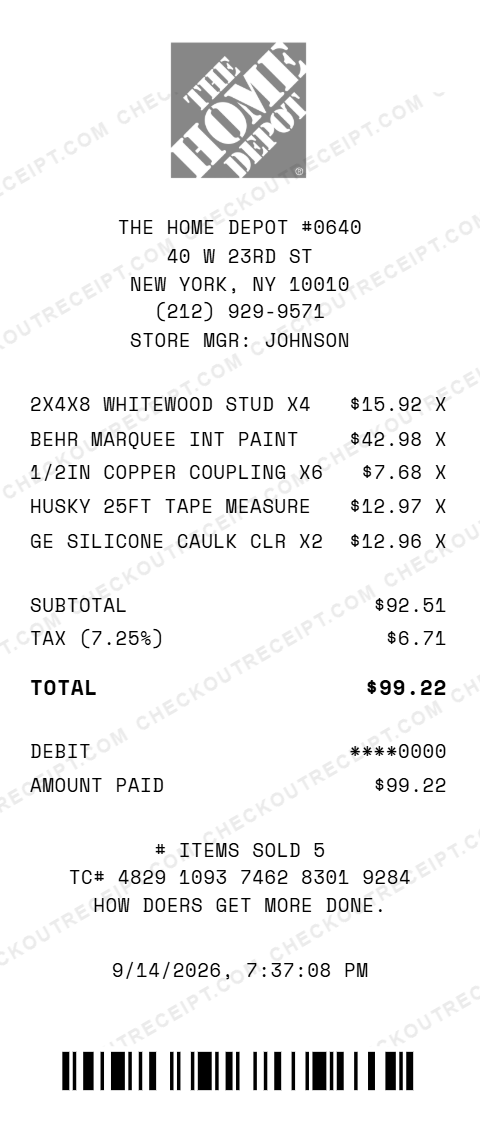
THE HOME DEPOT #0640
40 W 23RD ST
NEW YORK, NY 10010
(212) 929-9571
STORE MGR: JOHNSON

2X4X8 WHITEWOOD STUD X4         $15.92 X
BEHR MARQUEE INT PAINT          $42.98 X
1/2IN COPPER COUPLING X6         $7.68 X
HUSKY 25FT TAPE MEASURE         $12.97 X
GE SILICONE CAULK CLR X2        $12.96 X

SUBTOTAL                        $92.51
TAX (7.25%)                      $6.71
TOTAL                           $99.22

DEBIT                         ****0000
AMOUNT PAID                     $99.22

TC# 4829 1093 7462 8301 9284
Everything You Need to Create a Realistic Home Depot Receipt
Every feature is designed to produce receipts that match authentic Home Depot formatting, from the store number to thermal-style fonts. Matches authentic Home Depot receipt layout including store number, department codes, SKU numbers, and section dividers.
How It Works (3 Steps, Under 2 Minutes)
Choose your template, customize the details, and download instantly as PNG or PDF.
Sample Home Depot Receipt Items
These are examples of real item formats that appear on Home Depot receipts. Our editor uses the same formatting conventions: 2X4X8 WHITEWOOD STUD, 2X6X12 #2 PRIME SPF, BEHR MARQUEE INT SATIN 1GAL, PURDY XL 2IN BRUSH, 1/2IN COPPER COUPLING, SHARKBITE 1/2IN PUSH FIT, ROMEX 14/2 NM-B 250FT, LEVITON 15A OUTLET WHT, 1LB 8D COMMON NAILS, GE SILICONE II CAULK CLR, HUSKY 25FT TAPE MEASURE, DEWALT 20V DRILL/DRIVER KIT, VIGORO 40LB TOPSOIL, SCOTTS TURF BUILDER 12.6LB, LIFEPROOF LVP TRAIL OAK, RHEEM 50GAL ELEC WATER HTR.
Tips for Creating Realistic Home Depot Receipts
Pro tips to make your generated receipts match the real thing. Look up actual product SKUs on homedepot.com for the items you're listing. Real SKUs are 5–9 digit numbers and add authenticity. Real Home Depot receipts tag every item with its department: LUMBER, PLUMBING, ELECTRICAL, PAINT, TOOLS, etc. This detail is key to realistic receipts. Home Depot format uses ALL CAPS for item descriptions. Keep descriptions uppercase and abbreviated like real receipts (e.g., 2X4X8 WHITEWOOD STUD, BEHR MARQUEE PAINT). Real Home Depot receipts include STORE MGR: followed by the manager's last name. This detail appears near the top and is fully editable. Home Depot's standard return window is 90 days for most items, 30 days for some categories. Include this at the bottom for realism. Check homedepot.com for current pricing on lumber, tools, paint, and hardware to match real receipt values. Home Depot prices vary by region and season.
Frequently Asked Questions
How do I use this Home Depot receipt generator?
Use the editor to enter your Home Depot store details, add items with prices and department codes, set a tax rate, and choose a payment method. Click PNG or PDF to download your receipt. No account or signup is required.
What does a real Home Depot receipt look like?
A real Home Depot receipt includes the Home Depot logo, store number and address, cashier and register details, each item with a SKU number and department code, subtotal, tax breakdown, total, payment method with card details, return policy, and a barcode at the bottom. Our template replicates all of these elements.
What are the codes on a Home Depot receipt?
Home Depot receipts show store number, register number, transaction number, and cashier ID near the top. Each item line includes a SKU number and department code (e.g., PLUMBING, ELECTRICAL, LUMBER). The bottom includes a transaction barcode and survey invitation code.
Can I customize the store location on the receipt?
Yes. You can enter any Home Depot store number, street address, city, state, ZIP code, and phone number. The default template uses a standard Home Depot store format.
What payment methods are available on the Home Depot receipt template?
The template supports Visa, Mastercard, American Express, Discover, Home Depot Consumer Credit Card, Home Depot Commercial Account, debit cards, and cash with change due calculation.
Does the receipt calculate tax automatically?
Yes. Select your state from the dropdown to auto-fill the base sales tax rate, or enter a custom rate. Tax is calculated in real-time on all taxable items.
What departments appear on Home Depot receipts?
Common departments include PLUMBING, ELECTRICAL, LUMBER, PAINT, HARDWARE, FLOORING, GARDEN, APPLIANCES, TOOLS, and BUILDING MATERIALS. Each item is tagged with its department on the receipt.
Can I add discount lines or volume pricing to the receipt?
Yes. The editor supports custom discount line items with any description and amount. You can add volume pricing adjustments, trade discounts, or any other deduction as a separate line item with a negative amount.
What file formats can I download the receipt in?
Receipts can be downloaded as PNG (image) or PDF (document). Both are high-resolution and suitable for printing, emailing, or uploading to expense management software.
Is this receipt generator legal to use?
This tool is designed for legitimate purposes including replacing lost receipts for actual purchases, training, design mockups, and demonstrations. Creating false receipts for fraudulent purposes is illegal and prohibited.
Last updated: September 2026
Other Receipt Templates
Check out our other receipt generators: Kroger Receipt Generator, Louis Vuitton Receipt Generator, Lowe's Receipt Generator, Macy's Receipt Generator, Marshalls Receipt Generator, McDonald's Receipt Generator, Nike Receipt Generator, Prada Receipt Generator, Publix Receipt Generator, Rolex Receipt Generator
Hardware Store Receipt Format Guide
See the full hardware store receipt format guide: every field explained, contractor pro pricing, and how to document Home Depot purchases for project expense reports.