CVS Pharmacy Receipt Generator
Create, Customize & Download Instantly
Generate a free CVS Pharmacy receipt for prescription records, HSA/FSA documentation, expense tracking, or insurance reimbursement. CVS receipts include a store number and address, itemized prescription and over-the-counter products, ExtraCare rewards details, a sales tax breakdown separating exempt prescriptions from taxable OTC items, payment method, coupon savings, and a transaction barcode. Customize every field and download instantly.
What Does a Real CVS Receipt Look Like?
CVS Pharmacy receipts follow a distinctive format with prescription details, tax-exempt codes, and an extended rewards and coupon section. Here is what every section includes. Store Header. The CVS/pharmacy logo, the store number (4 digits), the full street address, city, state, ZIP code, and phone number. Every CVS location has a unique store number. Itemized Products. Each item shows the product name in uppercase, the SKU or UPC number, the quantity, the price, and a tax code. Prescription items include the Rx number, drug name, strength, and quantity dispensed. Tax Codes & Breakdown. Each item is tagged with a tax code: N for non-taxable (prescriptions, some food), X or T for taxable at the state rate. The receipt shows the subtotal, tax amount, and total separately. Payment Method. The payment line shows the card type (Visa, Mastercard, etc.) with the last 4 digits, an approval code, and the amount paid. Cash transactions show the amount tendered and change due. ExtraCare Rewards. The ExtraCare card number (masked), ExtraBucks earned on this transaction, and the available ExtraBucks balance. This section is a signature element of CVS receipts. Coupons & Savings. Manufacturer coupons applied, ExtraBucks redeemed, and a prominent YOU SAVED line at the bottom. The coupon section on a real CVS receipt can be longer than the transaction itself.
Sample CVS Receipt
The editor on this page opens with this sample CVS Pharmacy receipt. Every value can be changed before you download it.
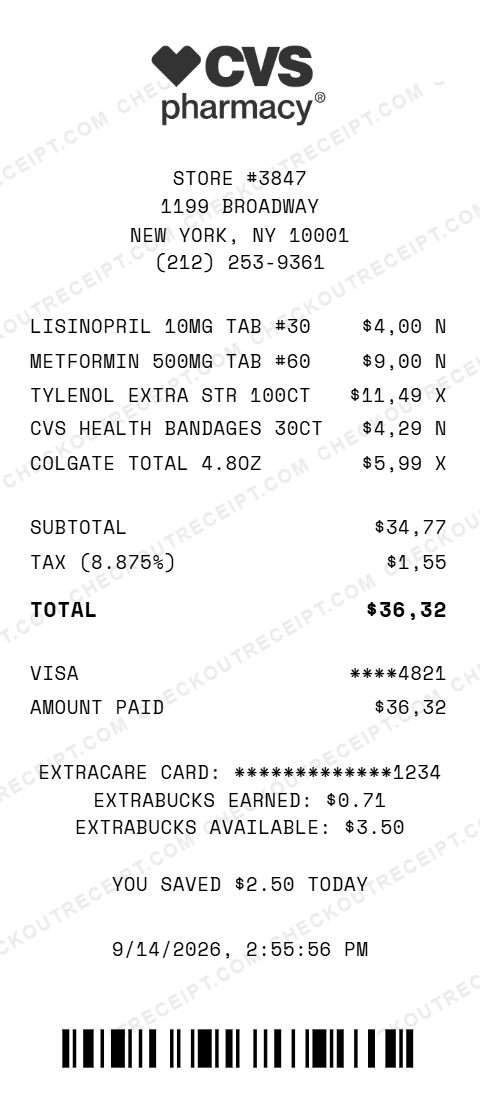
CVS PHARMACY
STORE #3847
1199 BROADWAY
NEW YORK, NY 10001
(212) 253-9361

LISINOPRIL 10MG TAB #30          $4.00 N
METFORMIN 500MG TAB #60          $9.00 N
TYLENOL EXTRA STR 100CT         $11.49 X
CVS HEALTH BANDAGES 30CT         $4.29 N
COLGATE TOTAL 4.8OZ              $5.99 X

SUBTOTAL                        $34.77
TAX (8.875%)                     $1.55
TOTAL                           $36.32

VISA                          ****4821
AMOUNT PAID                     $36.32
Everything You Need to Create a Realistic CVS Receipt
Every feature is designed to produce receipts that match authentic CVS pharmacy formatting, from prescription Rx numbers to ExtraCare rewards. Add prescription items with Rx numbers, drug names, quantities, day supply, and copay amounts. Toggle HSA/FSA eligibility per item. Include ExtraCare card number, ExtraBucks earned, and ExtraBucks balance. Matches the rewards section on real CVS receipts. Prescriptions are automatically flagged as tax-exempt. OTC items taxed at the state rate. Select your state for auto-calculation.
How It Works (3 Steps, Under 2 Minutes)
Choose your template, customize the receipt details, and download instantly as PNG or PDF.
Sample CVS Receipt Items
These are examples of product and pricing formats that appear on CVS pharmacy receipts. Our editor uses the same formatting conventions: LISINOPRIL 10MG TAB (Rx #7234891), METFORMIN 500MG TAB (Rx #7234892), TYLENOL EXTRA STR 100CT, CVS HEALTH BANDAGES 30CT, COLGATE TOTAL 4.8OZ, COCA-COLA 20OZ.
Tips for Creating Realistic CVS Receipts
Pro tips to make your generated receipts match the real thing. CVS store numbers are 4 digits (e.g., #3847). Look up a real store number for your city to add authenticity. All prescription drugs are tax-exempt in every US state. Mark Rx items with tax code N. The ExtraCare rewards block is a signature element of CVS receipts. Include the card number and ExtraBucks for realism. Some states exempt OTC medicine from tax (e.g., New York). Select your state and the calculator handles the rest. CVS receipts always show 'YOU SAVED $X.XX TODAY' near the bottom. Add this via the Custom Message section.
Frequently Asked Questions
How do I use this CVS receipt generator?
Use the editor to enter your CVS store details, add prescription and over-the-counter items, set your ExtraCare card number, choose your state for tax calculation, and pick a payment method. Click PNG or PDF to download your receipt. No account or signup is required.
What does a real CVS receipt look like?
A real CVS receipt includes the CVS/pharmacy logo, the store number and address, a phone number, itemized products with prices and tax codes (T for taxable, N for non-taxable), a subtotal, state sales tax, total, payment method with last 4 digits, ExtraCare card number, ExtraBucks earned, coupons applied, total savings, a transaction barcode, and the date, time, register number, and cashier ID. CVS receipts are famously long because of the coupon and rewards section printed after the transaction details.
Why are CVS receipts so long?
CVS receipts include a transaction section (items, tax, payment) followed by an extended coupon and rewards section. This second section prints ExtraBucks earned, ExtraBucks available, manufacturer coupons, percentage-off coupons, and targeted offers based on your purchase history. The coupon section can be longer than the actual transaction. Our generator includes the core transaction section; the coupon block is customizable via the free-text section.
How does CVS handle prescription items on receipts?
Prescription items appear with the drug name, strength, quantity, days supply, Rx number, and the copay amount. Prescriptions are exempt from sales tax in all 50 US states. The receipt also flags items as HSA/FSA eligible where applicable. Our template lets you add prescription line items with all of these fields.
What is the ExtraCare rewards program?
ExtraCare is CVS's loyalty program. Members earn 2% back in ExtraBucks Rewards on most purchases (excluding prescriptions and some exclusions). ExtraBucks print on the receipt and can be redeemed on future purchases. The receipt shows your ExtraCare card number, ExtraBucks earned this transaction, and your available ExtraBucks balance. Our template includes editable fields for all of these.
How does sales tax work on CVS receipts?
CVS receipts use tax codes next to each item price. T means the item is taxable at the state rate, N means non-taxable (prescriptions, most food items in some states). The receipt shows a tax subtotal and the tax amount separately. Prescription drugs are tax-exempt in all US states. Over-the-counter medicine tax treatment varies by state. Our editor auto-calculates tax when you select a state.
What payment methods are available on the CVS receipt template?
The template supports Visa, Mastercard, American Express, Discover, debit cards, cash, and HSA/FSA cards. You can enter the card type and the last 4 digits so the payment line matches your purchase. HSA and FSA cards are common at CVS since many health items and all prescriptions qualify.
Can I add coupons and savings to the CVS receipt?
Yes. Use the Custom Message section to add a coupon and savings block below the transaction details. You can list manufacturer coupons applied, ExtraBucks redeemed, and a total savings line. Real CVS receipts prominently display savings at the bottom of the receipt.
What is the CVS return policy?
Most CVS purchases can be returned within 60 days with a receipt. Beauty products have a 30-day window. Prescriptions, opened personal care items, and some health products are non-returnable. The receipt includes the return policy reminder at the bottom, which our template replicates.
Is this receipt generator legal to use?
This tool is designed for legitimate purposes including replacing lost receipts for actual purchases, HSA/FSA expense documentation, insurance reimbursement records, training, design mockups, and demonstrations. Creating false receipts for fraudulent purposes is illegal and prohibited. CheckoutReceipt is not affiliated with, endorsed by, or sponsored by CVS Health Corporation.
Last updated: September 2026
Other Receipt Templates
Check out our other receipt generators: Dunkin' Donuts Receipt Generator, GOAT Receipt Generator, Gucci Receipt Generator, Hermes Receipt Generator, Home Depot Receipt Generator, Kroger Receipt Generator, Louis Vuitton Receipt Generator, Lowe's Receipt Generator, Macy's Receipt Generator, Marshalls Receipt Generator
Pharmacy Receipt Format Guide
See the full pharmacy receipt format guide: every field explained, how prescription vs OTC items are taxed, and how to document CVS purchases for HSA/FSA and insurance reimbursement. CVS also operates as a convenience store for snacks and household items, and processes money transfer receipts via in-store MoneyGram services.