Burlington Receipt Generator
Create, Customize & Download Instantly
Generate a free Burlington receipt for off-price retail records with markdown item pricing (no compare-at field), Burlington Store Credit as a dedicated payment option, the cashier and register header block (CASHIER: JENNIFER REG 03), real transaction numbers, and the standard 30-day return policy footer. Useful for clothing returns, gift verification, or expense tracking. Customize and download instantly.
What Does a Real Burlington Receipt Look Like?
Burlington receipts follow a consistent format across all 1,000+ US store locations. Here is what every section includes. Store Header. The Burlington logo and store name printed at the top of every receipt, followed by store number, full street address, city, state, ZIP, and phone number. Transaction Details. Date, time, cashier name, and register number uniquely identify every Burlington transaction. The transaction number is used for return and exchange lookups. Line Items. Each item shows a description and tag price. Burlington off-price merchandise is listed at the marked-down price: you see exactly what you paid. Subtotal & Tax. Subtotal calculated before tax. Sales tax applied at the state and local rate. Burlington collects tax on all taxable merchandise including clothing in most states. Payment Method. Tender type shown with last 4 digits for card payments. Burlington accepts Visa, Mastercard, Amex, Discover, debit, cash, store credit, and gift cards. Change due shown for cash transactions. Return Policy Footer. Every Burlington receipt ends with the 30-day return policy reminder. Items must be unworn with tags attached and original receipt presented.
Sample Burlington Receipt
The editor on this page opens with this sample Burlington receipt. Every value can be changed before you download it.
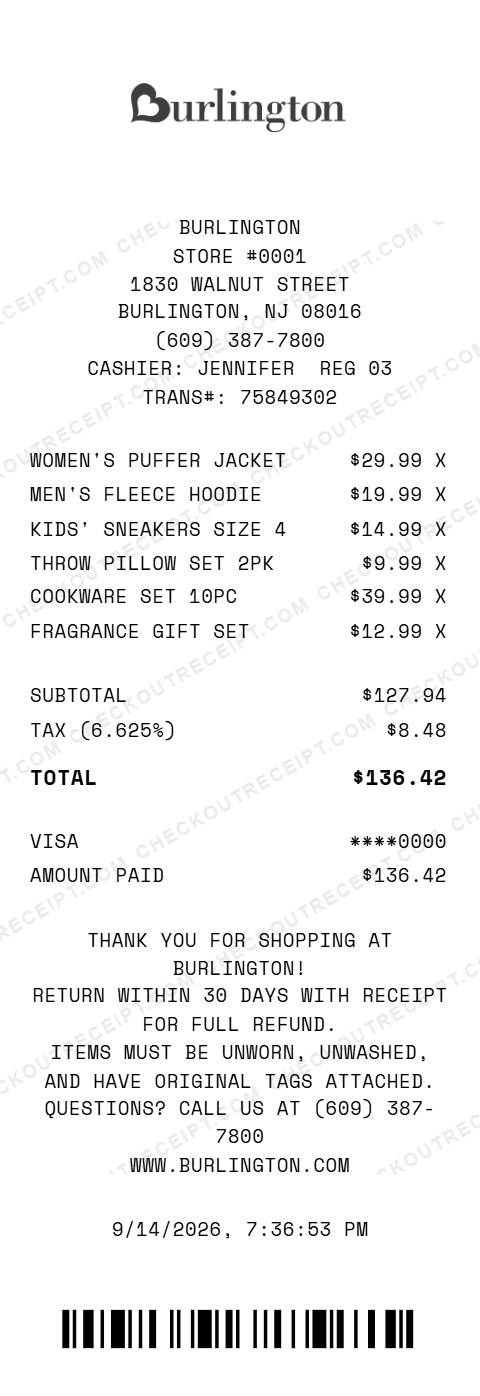
BURLINGTON
STORE #0001
1830 WALNUT STREET
BURLINGTON, NJ 08016
(609) 387-7800
CASHIER: JENNIFER  REG 03
TRANS#: 75849302

WOMEN'S PUFFER JACKET           $29.99 X
MEN'S FLEECE HOODIE             $19.99 X
KIDS' SNEAKERS SIZE 4           $14.99 X
THROW PILLOW SET 2PK             $9.99 X
COOKWARE SET 10PC               $39.99 X
FRAGRANCE GIFT SET              $12.99 X

SUBTOTAL                       $127.94
TAX (6.625%)                     $8.48
TOTAL                          $136.42

VISA                          ****0000
AMOUNT PAID                    $136.42
Everything You Need to Create a Realistic Burlington Receipt
Every feature is designed to produce receipts that match authentic Burlington formatting. Matches real Burlington receipt layout including store number, transaction ID, cashier name, register, and SKU line items.
How It Works (3 Steps, Under 2 Minutes)
Choose your template, customize the details, and download instantly as PNG or PDF.
Sample Burlington Receipt Items
These are examples of real item formats that appear on Burlington receipts. Our editor uses the same formatting conventions: Women's Puffer Jacket, Men's Fleece Hoodie, Kids' Sneakers Size 4, Throw Pillow Set 2pk, Cookware Set 10pc, Fragrance Gift Set, Women's Dress Midi, Men's Dress Shirt, Bath Towel Set 4pk, Area Rug 5x7, Toddler Pajama Set, Scented Candle 3-Wick, Men's Running Shoes, Storage Basket Set, Women's Cardigan, Kids' Backpack.
Tips for Creating Realistic Burlington Receipts
Pro tips to make your generated receipts match the real thing. Burlington sells merchandise at 40–70% below department store prices. Keep prices in the $7.99–$59.99 range for most apparel and home goods to look authentic. Select your state from the dropdown to auto-fill the correct sales tax rate. Note: some states exempt clothing from sales tax (Vermont, Pennsylvania, New Jersey, and others). Burlington SKU codes are typically 9–13 digit numeric sequences printed on the price tag. Use the sample SKUs in our reference table as a guide. Burlington store numbers are 4 digits. Find your local store number on Burlington's store locator at burlington.com/stores. Every authentic Burlington receipt ends with the 30-day return policy. Our default custom message section includes this text. Keep it in for maximum realism. Burlington carries womens, mens, and kids apparel, footwear, home decor, bath, kitchen, beauty, and baby items. Receipts listing electronics or groceries would look out of place.
Frequently Asked Questions
How do I use this Burlington receipt generator?
Use the editor to enter your Burlington store details, store number, add items with tag prices and SKU codes, set a tax rate, and choose a payment method. Click PNG or PDF to download your receipt. No account or signup required.
What does a real Burlington receipt look like?
A real Burlington receipt includes the Burlington logo and store name, store number and address, date and time of transaction, each item with a description and tag price, subtotal, sales tax, total amount, payment method, and a return policy reminder. Receipts are printed on narrow thermal paper. Our template replicates all of these elements.
What is Burlington's return policy shown on the receipt?
Burlington's standard return policy allows returns within 30 days of purchase with the original receipt. Items must be in original condition with tags attached. The return policy reminder is printed at the bottom of every receipt. Our template includes this by default.
Can I customize the store location on the receipt?
Yes. You can enter any Burlington store number, street address, city, state, ZIP code, and phone number. Burlington operates over 1,000 stores across the US and Puerto Rico.
What payment methods are available on the Burlington receipt template?
The template supports Visa, Mastercard, American Express, Discover, debit cards, cash with change due calculation, Burlington store credit, and gift cards.
Does the receipt calculate tax automatically?
Yes. Select your state from the dropdown to auto-fill the base sales tax rate, or enter a custom rate. Tax is calculated in real-time on all taxable items.
What are typical Burlington item SKU formats?
Burlington SKU codes are typically 9–13 digit numeric sequences printed on the price tag. The receipt shows the item description and price. Our editor lets you enter any SKU and description to match your items.
Can I add clearance or markdown items?
Yes. Burlington is known for off-price merchandise at 40–70% below department store prices. You can add any item with its marked-down price. The receipt format is the same regardless of whether items are regular price or clearance.
What file formats can I download the receipt in?
Receipts can be downloaded as PNG (image) or PDF (document). Both are high-resolution and suitable for printing, emailing, or uploading to expense management software.
Is this receipt generator legal to use?
This tool is designed for legitimate purposes including replacing lost receipts for actual purchases, training, design mockups, and demonstrations. Creating false receipts for fraudulent purposes is illegal and prohibited.
Last updated: September 2026
Other Receipt Templates
Check out our other receipt generators: Cartier Receipt Generator, Chanel Receipt Generator, Chick-fil-A Receipt Generator, Christian Dior Receipt Generator, Costco Receipt Generator, CVS Pharmacy Receipt Generator, Dunkin' Donuts Receipt Generator, GOAT Receipt Generator, Gucci Receipt Generator, Hermes Receipt Generator
Clothing Store Receipt Format Guide
See the full clothing store receipt format guide: every field explained, state apparel tax exemptions, and how to document Burlington purchases for expense reports or returns.