Walmart Receipt Generator
Create, Customize & Download Instantly
Build a free Walmart receipt with our online generator: full 16-digit TC# transaction codes, Great Value (GV) brand items, EBT/SNAP payment options, and the 'Low Prices You Can Trust' footer. Ideal for expense reports, returns documentation, or personal recordkeeping. Customize the line items, totals, and store details, then download instantly.
For a generic grocery receipt without Walmart branding, use our grocery receipt generator.
What Does a Real Walmart Receipt Look Like?
Walmart receipts follow a consistent format across all 4,700+ store locations. Here is what every section includes. Header: Store Identification. The Walmart spark logo, store type (Supercenter or Neighborhood Market), store number, full street address, city, state, ZIP, phone number, and manager name. This identifies the specific Walmart location. Transaction Codes. Four codes appear below the header: ST# (store number), OP# (operator/cashier ID), TE# (terminal/register number), and TR# (transaction number). These uniquely identify every transaction processed at the register. Itemized Products. Each item shows the product description, quantity if more than one, and the price. A single-letter tax code appears next to each price: N (non-taxable), X (taxed at standard rate), or O (zero-rated). Walmart uses UPC-based product descriptions. Tax Breakdown & Totals. Shows the subtotal, then each applicable tax rate with the taxed amount and tax charged. The total amount due follows. Walmart receipts can show multiple tax rates if items fall under different categories. Payment Method. Displays how the customer paid: credit or debit card type with last 4 digits, Walmart Pay, EBT/SNAP with balance remaining, or cash with change due. Includes approval code and reference number for card payments. Savings, Message & Barcode. Shows any savings from rollback prices or coupons, the TC# transaction code string, the Walmart slogan, date/time stamp, and a scannable barcode encoding the transaction for returns and records.
Sample Walmart Receipt
The editor on this page opens with this sample Walmart receipt. Every value can be changed before you download it.
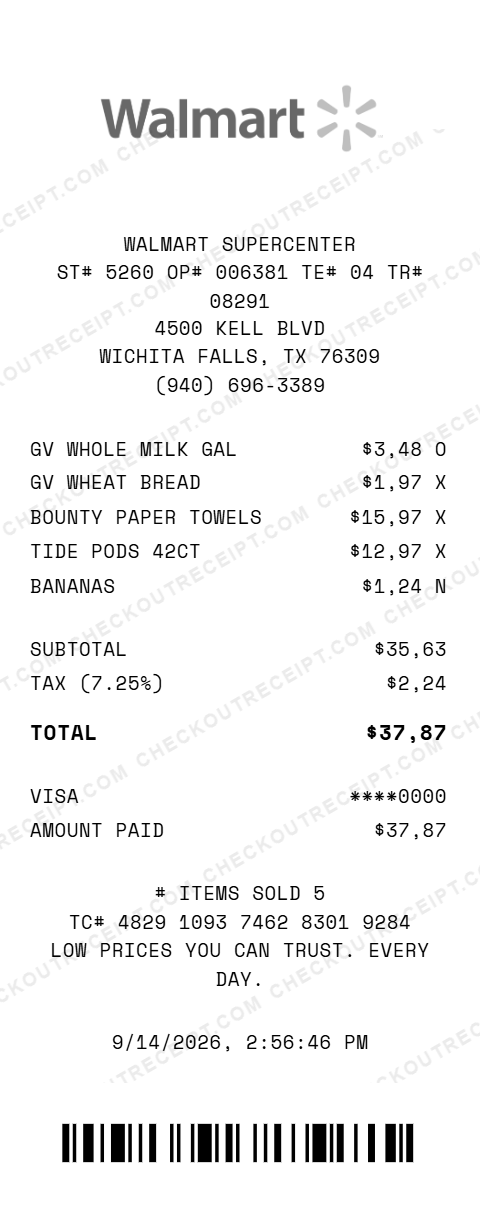
WALMART SUPERCENTER
ST# 5260 OP# 006381 TE# 04 TR# 08291
4500 KELL BLVD
WICHITA FALLS, TX 76309
(940) 696-3389

GV WHOLE MILK GAL                $3.48 O
GV WHEAT BREAD                   $1.97 X
BOUNTY PAPER TOWELS             $15.97 X
TIDE PODS 42CT                  $12.97 X
BANANAS                          $1.24 N

SUBTOTAL                        $35.63
TAX (7.25%)                      $2.24
TOTAL                           $37.87

VISA                          ****0000
AMOUNT PAID                     $37.87

TC# 4829 1093 7462 8301 9284
Everything You Need to Create a Realistic Walmart Receipt
Every feature is designed to produce receipts that match authentic Walmart formatting, from the spark logo to thermal-style fonts. Matches authentic Walmart receipt layout including transaction codes, tax codes, and section dividers.
How It Works (3 Steps, Under 2 Minutes)
Choose your template, customize the details, and download instantly as PNG or PDF.
Sample Walmart Receipt Items
These are examples of real item formats that appear on Walmart receipts. Our editor uses the same formatting conventions: GV WHOLE MILK GAL, GV WHEAT BREAD 20OZ, BANANAS 2.31LB, BOUNTY PAPER TOWELS 8CT, TIDE PODS ORIG 42CT, OL ROY DRY DOG FOOD 50LB, PURINA CAT CHOW 16LB, FRUIT OF LOOM 5PK TEE, WRANGLER RELAXED JEANS, EQUATE IBUPROFEN 500CT.
Tips for Creating Realistic Walmart Receipts
Pro tips to make your generated receipts match the real thing. Use the correct store type: Walmart Supercenter for full stores, Neighborhood Market for grocery-focused locations. This appears at the top of every receipt. Select the store's state from the tax dropdown to auto-fill the base rate. For extra accuracy, add the local city or county tax (usually 0.5–2% on top of the state rate). Use Walmart's brand names for realistic items: Great Value (GV), Equate, Ol' Roy, Parent's Choice, Mainstays, and Sam's Choice. Descriptions use ALL CAPS. Include all four transaction codes (ST#, OP#, TE#, TR#). Real Walmart receipts always show these near the top. Each code is fully editable in the editor. Set the receipt time within Walmart hours. Most Supercenters operate 6:00 AM to 11:00 PM. Weekend dates typically show higher item counts. Enable grayscale mode before downloading. Real thermal receipts are black on white: color logos and text look less authentic on a printed receipt.
Walmart Receipt Examples
See how different Walmart receipt configurations look with our generator.
- Meat & Grocery: Lamb Chop, Split Breast, Root Beer
- Snacks & Soda: Tostitos, Dr Thunder, Mt Lightning
- Fresh Cut Fruit: Salad Kit, Cantaloupe, Watermelon
- Dog Vitamin Supplement: NaturVet daily multi-vitamin
- Glucosamine Chews: Strellalab joint supplement
- Shark Vacuum: Shark Vacuum Cleaner
- Women's Skorts: Avia Skort, Reebok Skort
- Kids Clothing: Boys Fleece, Kids Sneakers
Frequently Asked Questions
How do I use this Walmart receipt generator?
Use the editor to enter your Walmart store details, add items with prices, set a tax rate, and choose a payment method. Click PNG or PDF to download your receipt. No account or signup is required.
What does a real Walmart receipt look like?
A real Walmart receipt includes the Walmart Supercenter or Neighborhood Market header, store number (ST#), operator number (OP#), terminal number (TE#), transaction number (TR#), each item with a UPC description and price, subtotal, tax breakdown, total, payment method with card details, and a barcode at the bottom. Our template replicates all of these elements.
What are the codes on a Walmart receipt?
ST# is the store number identifying the Walmart location. OP# is the operator or cashier ID. TE# is the terminal or register number. TR# is the unique transaction number. TC# is the transaction count for that register. These codes appear near the top of every Walmart receipt.
Can I customize the store location on the receipt?
Yes. You can enter any Walmart store number, street address, city, state, ZIP code, and phone number. You can also set it as a Walmart Supercenter or Neighborhood Market.
What payment methods are available on the Walmart receipt template?
The template supports Visa, Mastercard, American Express, Discover, Walmart Pay, debit cards, EBT/SNAP, and cash with change due calculation.
Does the receipt calculate tax automatically?
Yes. Select your state from the dropdown to auto-fill the base sales tax rate, or enter a custom rate. Tax is calculated in real-time. Walmart receipts show tax-exempt items marked with specific tax codes.
What are the tax codes on Walmart receipts?
Walmart uses letter codes next to each item price to indicate tax status. Common codes include N (non-taxable), X (taxed at standard rate), and O (zero-rated). These vary by state and item category.
Can I add discount lines or savings summaries to the receipt?
Yes. The editor supports custom discount line items with any description and amount. You can add promotional deductions, price adjustments, or savings totals as separate line items with negative amounts.
What file formats can I download the receipt in?
Receipts can be downloaded as PNG (image) or PDF (document). Both are high-resolution and suitable for printing, emailing, or uploading to expense management software.
Is this receipt generator legal to use?
This tool is designed for legitimate purposes including replacing lost receipts for actual purchases, training, design mockups, and demonstrations. Creating false receipts for fraudulent purposes is illegal and prohibited.
Last updated: September 2026
Other Receipt Templates
Check out our other receipt generators: Whole Foods Market Receipt Generator, Apple Store Receipt Generator, AutoZone Receipt Generator, Balenciaga Receipt Generator, Best Buy Receipt Generator, Bulgari Receipt Generator, Burlington Receipt Generator, Cartier Receipt Generator, Chanel Receipt Generator, Chick-fil-A Receipt Generator
Retail Receipt Format Guide
See the full retail receipt format guide: every field explained, item codes, state tax treatment, and how to document Walmart purchases for expense reports or reimbursements.