Whole Foods Market Receipt Generator
Create, Customize & Download Instantly
Create a free Whole Foods Market receipt with PRIME MEMBER SAVINGS lines, 365 store-brand items with the OG (organic) prefix, 11-digit PLU codes starting with 9 for organic produce, and BULK section pricing per pound. Use for grocery expense tracking, organic-food records, or Prime membership bookkeeping. Customize every field and download as PNG or PDF.
What Does a Real Whole Foods Market Receipt Look Like?
Whole Foods Market receipts follow a consistent format across all 530+ store locations. Here is what every section includes. Header: Store Identification. The Whole Foods Market logo, store number (e.g., #10446), full street address, city, state, ZIP, and phone number. Some locations also include the team leader name. Item Lines: Product Details. Each item shows a description (often abbreviated), PLU or UPC code, quantity, and price. Organic items use 5-digit PLU codes starting with 9. Weight-based items show price per pound and net weight. 365 Everyday Value brand items are labeled with '365' prefix. Department Tags. Items are grouped or tagged by department: PRODUCE, GROCERY, BULK, PREPARED FOODS, BAKERY, MEAT, SEAFOOD, DAIRY, FROZEN, SUPPLEMENTS, BODY CARE, BEER/WINE, and FLORAL. Tax Summary & Totals. Tax-exempt grocery items are marked 'N' (non-taxable). Prepared foods, supplements, and non-food items are marked 'X' (taxable). The receipt shows subtotal, tax by category, total, and amount tendered with change due. Payment Method. Shows the payment type (VISA, MASTERCARD, AMEX, DEBIT, CASH, EBT, Whole Foods Gift Card, or Amazon Prime Rewards Visa). Card payments display last 4 digits, approval code, and transaction type. Prime Savings, Return Policy & Barcode. Whole Foods receipts show Amazon Prime member savings if applicable, the return policy (30-day refund with receipt), a customer survey invitation, and a scannable barcode for returns.
Sample Whole Foods Market Receipt
The editor on this page opens with this sample Whole Foods Market receipt. Every value can be changed before you download it.
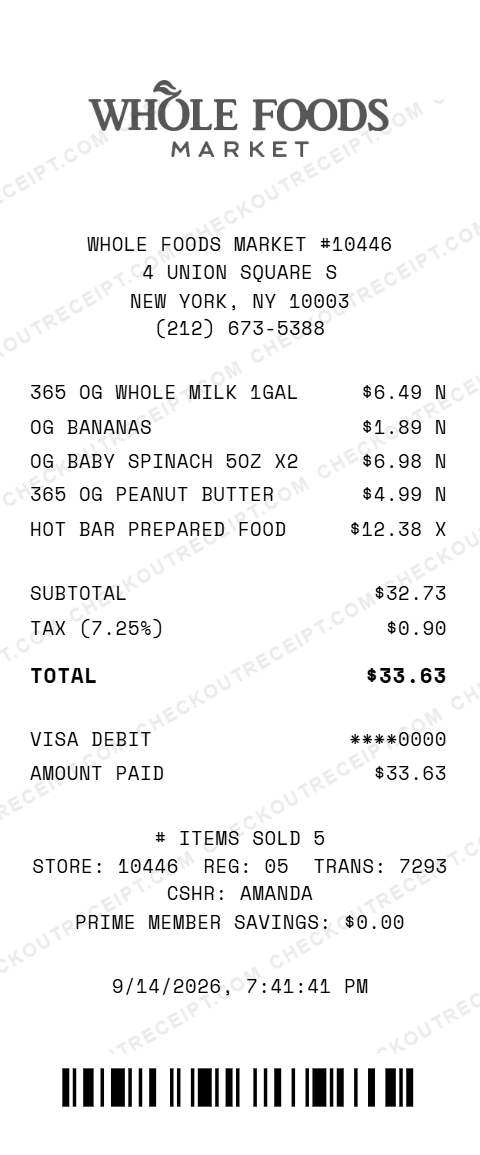
WHOLE FOODS MARKET #10446
4 UNION SQUARE S
NEW YORK, NY 10003
(212) 673-5388

365 OG WHOLE MILK 1GAL           $6.49 N
OG BANANAS                       $1.89 N
OG BABY SPINACH 5OZ X2           $6.98 N
365 OG PEANUT BUTTER             $4.99 N
HOT BAR PREPARED FOOD           $12.38 X

SUBTOTAL                        $32.73
TAX (7.25%)                      $0.90
TOTAL                           $33.63

VISA DEBIT                    ****0000
AMOUNT PAID                     $33.63

STORE: 10446  REG: 05  TRANS: 7293  CSHR: AMANDA
Everything You Need to Create a Realistic Whole Foods Market Receipt
Every feature is designed to produce receipts that match authentic Whole Foods Market formatting, from the store number to thermal-style fonts. Matches authentic Whole Foods Market receipt layout including store number, organic PLU codes, department tags, and section dividers.
How It Works (3 Steps, Under 2 Minutes)
Choose your template, customize the details, and download instantly as PNG or PDF.
Sample Whole Foods Market Receipt Items
These are examples of real item formats that appear on Whole Foods Market receipts. Our editor uses the same formatting conventions: OG BANANAS, OG AVOCADO HASS, OG BABY SPINACH 5OZ, FUJI APPLE, 365 OG PEANUT BUTTER 16OZ, 365 OG PASTA PENNE 16OZ, 365 OG EXTRA VIRGIN OLIVE OIL, 365 OG WHOLE MILK 1GAL, 365 OG LARGE EGGS DOZEN, OG ROLLED OATS, OG RAW CASHEWS, HOT BAR PREPARED FOOD, SUSHI SPICY TUNA ROLL, OG SOURDOUGH BREAD, OG GRASS-FED GROUND BEEF, 365 TURMERIC CAPS 60CT.
Tips for Creating Realistic Whole Foods Market Receipts
Pro tips to make your generated receipts match the real thing. Organic items start with 9 (e.g., 94011 for organic bananas, 94225 for organic avocados). Look up codes on the IFPS database or at the store. This is Whole Foods' store brand: prices are typically 20-30% lower than name-brand equivalents. Use the '365' prefix in item descriptions. Unprepared groceries are tax-exempt in most states. Prepared foods (hot bar, salad bar), supplements, and body care items are taxable. Real Whole Foods receipts show price per pound, net weight, and calculated total for items sold by weight. Real Whole Foods receipts show a 'PRIME MEMBER SAVINGS' line at the bottom tallying the total discount from Prime-exclusive deals. Check wholefoodsmarket.com or the Whole Foods app for current pricing on organic produce, 365 brand staples, and prepared foods to match real receipt values.
Frequently Asked Questions
What items can I add to a Whole Foods Market receipt?
You can add any Whole Foods product including organic produce, 365 Everyday Value items, bulk section goods, prepared foods, bakery items, supplements, body care products, and specialty items like artisan cheese and craft beverages.
Does the receipt include Amazon Prime member savings?
Yes. You can add Prime member discount lines showing the 10% off select sale items that Prime members receive, as well as Prime exclusive deal savings. The editor supports custom discount descriptions and amounts.
Can I customize the store location and details?
Yes. Edit the store name, store number, address, city, state, ZIP code, and phone number. You can match any of the 530+ Whole Foods Market locations across the US, Canada, and UK.
How does the tax calculation work for grocery items?
Select your state from the dropdown to auto-fill the base sales tax rate, or enter a custom rate. Most grocery items at Whole Foods are tax-exempt in many states, while prepared foods and non-food items are taxable. You can set tax codes per item.
What departments appear on Whole Foods Market receipts?
Common departments include PRODUCE, GROCERY, BULK, PREPARED FOODS, BAKERY, MEAT, SEAFOOD, DAIRY, FROZEN, SUPPLEMENTS, BODY CARE, BEER/WINE, and FLORAL. Each item can be tagged with its department.
Can I add weight-based and per-pound pricing?
Yes. The editor supports both unit pricing and per-pound pricing for items like organic produce, bulk nuts, deli items, and cheese. Enter the weight and price-per-pound and the total calculates automatically.
What PLU codes are used on Whole Foods receipts?
Whole Foods uses standard PLU codes for produce. Conventional produce has 4-digit codes starting with 3 or 4 (e.g., 4011 for bananas). Organic produce adds a 9 prefix making it 5 digits (e.g., 94011 for organic bananas).
Can I include 365 Everyday Value brand items?
Yes. Add any 365 brand product with its UPC code and description. The 365 Everyday Value line includes pantry staples, snacks, frozen meals, cleaning supplies, and personal care items at lower price points.
What file formats can I download the receipt in?
Receipts can be downloaded as PNG (image) or PDF (document). Both are high-resolution and suitable for printing, emailing, or uploading to expense management software.
Is this receipt generator legal to use?
This tool is designed for legitimate purposes including replacing lost receipts for actual purchases, training, design mockups, and demonstrations. Creating false receipts for fraudulent purposes is illegal and prohibited.
Last updated: September 2026
Other Receipt Templates
Check out our other receipt generators: Apple Store Receipt Generator, AutoZone Receipt Generator, Balenciaga Receipt Generator, Best Buy Receipt Generator, Bulgari Receipt Generator, Burlington Receipt Generator, Cartier Receipt Generator, Chanel Receipt Generator, Chick-fil-A Receipt Generator, Christian Dior Receipt Generator
Grocery Receipt Format Guide
See the full grocery receipt format guide: every field explained, food tax exemptions by state, and how to document grocery purchases for expense reports.