Subway Receipt Generator
Create, Customize & Download Instantly
Need a Subway receipt? Our free generator builds accurate Subway records with FOOTLONG and 6 INCH item formats, 3-digit Subway item codes (001 for footlongs, 006 for 6-inch), the standard www.tellsubway.com survey footer reference, and Subway Gift Card payment options. Great for restaurant expense tracking, meal-allowance records, or personal bookkeeping. Customize and download free.
What Does a Real Subway Receipt Look Like?
A real Subway receipt follows a specific thermal printer format. The header shows the Subway logo, store number, full address, and phone number. Each line item appears with the product name, any customizations, quantity, and price. Subway receipts include the server name, date, time, terminal ID, and transaction number. The subtotal, tax line, and total are clearly separated, followed by the payment method and change due. Most Subway receipts also include a survey invitation to tellsubway.com for a chance to win a free cookie.
Sample Subway Receipt
The editor on this page opens with this sample Subway receipt. Every value can be changed before you download it.
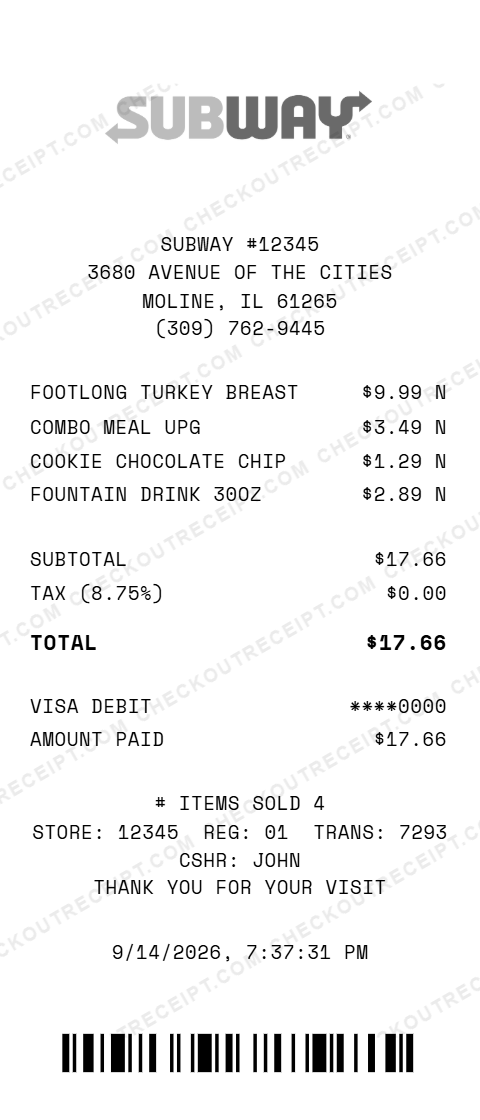
SUBWAY #12345
3680 AVENUE OF THE CITIES
MOLINE, IL 61265
(309) 762-9445

FOOTLONG TURKEY BREAST           $9.99 N
COMBO MEAL UPG                   $3.49 N
COOKIE CHOCOLATE CHIP            $1.29 N
FOUNTAIN DRINK 30OZ              $2.89 N

SUBTOTAL                        $17.66
TAX (8.75%)                      $0.00
TOTAL                           $17.66

VISA DEBIT                    ****0000
AMOUNT PAID                     $17.66

STORE: 12345  REG: 01  TRANS: 7293  CSHR: JOHN
Everything You Need to Create a Realistic Subway Receipt
Every feature is designed to produce receipts that match authentic Subway formatting. Customize the store number, address, and phone number for any of the 20,000+ US Subway locations. Add menu items including Footlong and 6-inch subs, wraps, salads, drinks, chips, cookies, and combo meals. Set the server name, register number, and transaction ID. Choose your payment method, cash with change due, or card with masked number. The receipt preview updates in real time as you edit.
How It Works (3 Steps, Under 2 Minutes)
Choose your template, customize the details, and download instantly as PNG or PDF.
Sample Subway Receipt Items
These are examples of real item formats that appear on Subway receipts: FOOTLONG TURKEY BREAST, 6 INCH ITALIAN BMT, FOOTLONG STEAK & CHEESE, WRAP CHICKEN BACON RANCH, FOUNTAIN DRINK 30OZ, COOKIE CHOCOLATE CHIP, CHIPS LAYS CLASSIC, FOOTLONG MEATBALL MARINARA, COMBO MEAL UPG, 6 INCH VEGGIE DELITE, FOOTLONG COLD CUT COMBO, DOUBLE MEAT UPG, EXTRA CHEESE.
Tips for Creating Realistic Subway Receipts
Pro tips to make your generated receipts match the real thing. Use ALL CAPS for item names as Subway thermal printers do. Include the combo meal upgrade line when adding a drink and chips. Add the tellsubway.com survey URL at the bottom. Use the correct store number format (5 digits like #12345). Set the server name: Subway receipts always show who made the order. Include the Term ID and Trans# in the format Term ID-Trans# 9/A-123456.
Frequently Asked Questions
What items can I add to a Subway receipt?
You can add any Subway menu item including Footlong and 6-inch subs (Turkey Breast, Italian BMT, Steak & Cheese, Meatball Marinara, Cold Cut Combo, Veggie Delite, Chicken Bacon Ranch, and all Subway Series subs), wraps, chopped salads, breakfast items, fountain drinks, bottled beverages, chips, cookies, and combo meal upgrades.
Does the receipt include the tellsubway.com survey footer?
Yes. You can add the standard Subway survey invitation using the free text section: the tellsubway.com URL, a validation code, and the free cookie offer message. This matches the survey block that appears at the bottom of real Subway receipts.
Can I customize the store location and details?
Yes. Edit the store number, address, city, state, ZIP code, and phone number. You can match any of the 20,000+ Subway locations across the United States. The store number format is a 5-digit number preceded by a hash.
How does the tax calculation work for Subway items?
Select your state from the dropdown to auto-fill the base sales tax rate, or enter a custom rate. Most prepared food at Subway is taxable. The receipt shows the subtotal, tax amount, and total separately, matching real Subway receipt formatting.
Can I add combo meals and meal upgrades?
Yes. The editor supports combo meal formatting where a base sub is listed first, followed by COMBO MEAL UPG as a separate line item. You can also add DOUBLE MEAT UPG and EXTRA CHEESE as add-on lines, matching how Subway POS systems print upgrades.
What payment methods are supported?
The generator supports cash payments (with Amount Tendered and Change Due lines), credit card (Visa, Mastercard, Amex, Discover with masked last 4 digits), debit card, Subway gift card, and mobile payment. Each payment method formats exactly as it appears on real receipts.
Can I create catering order receipts?
The standard generator covers individual orders. Subway catering receipts have a different format with platter names, serving counts, and delivery information. Use the regular template for single-transaction receipts.
What file formats can I download the receipt in?
Receipts can be downloaded as PNG (image) or PDF (document). Both are high-resolution and suitable for printing, emailing, or uploading to expense management software.
Is this receipt generator legal to use?
This tool is designed for legitimate purposes including replacing lost receipts for actual purchases, training, design mockups, and demonstrations. Creating false receipts for fraudulent purposes is illegal and prohibited.
Last updated: September 2026
Other Receipt Templates
Check out our other receipt generators: Target Receipt Generator, Tiffany & Co Receipt Generator, Walgreens Receipt Generator, Walmart Receipt Generator, Whole Foods Market Receipt Generator, Apple Store Receipt Generator, AutoZone Receipt Generator, Balenciaga Receipt Generator, Best Buy Receipt Generator, Bulgari Receipt Generator
Fast Food Receipt Format Guide
See the full fast food receipt format guide - every field explained, tip and tax treatment by state, and how to document Subway purchases for expense reports. For franchise dine-in formats see the restaurant receipt template, and for platter orders use the catering receipt generator.