Ross Dress For Less Receipt Generator
Create, Customize & Download Instantly
Generate a free Ross Dress for Less receipt with authentic brand-name item descriptions in ALL CAPS (LADIES DRESS CALVIN KLEIN, MENS POLO RALPH LAUREN), 12-digit Ross SKUs, the 'THANK YOU FOR SHOPPING ROSS / Tell us at www.rosslistens.com' survey footer, and consistent off-price retail apparel tax codes. Useful for clothing returns, gift documentation, or expense records.
What Does a Real Ross Dress For Less Receipt Look Like?
A real Ross Dress For Less receipt follows a specific thermal printer format. At the top you'll find the Ross logo and store number with address. Below that is the register number, transaction number, cashier ID, and date/time stamp. The item section lists each product in ALL CAPS with the item code, department, brand name, and price. Ross receipts show the original retail price crossed out with the Ross discount price next to it for many items. Below the items is the subtotal, state sales tax, and total. The payment section shows the method (cash, credit, or debit) with card details. At the bottom is the 30-day return policy reminder, a customer survey invitation, and a scannable barcode for returns.
Sample Ross Dress For Less Receipt
The editor on this page opens with this sample Ross Dress For Less receipt. Every value can be changed before you download it.
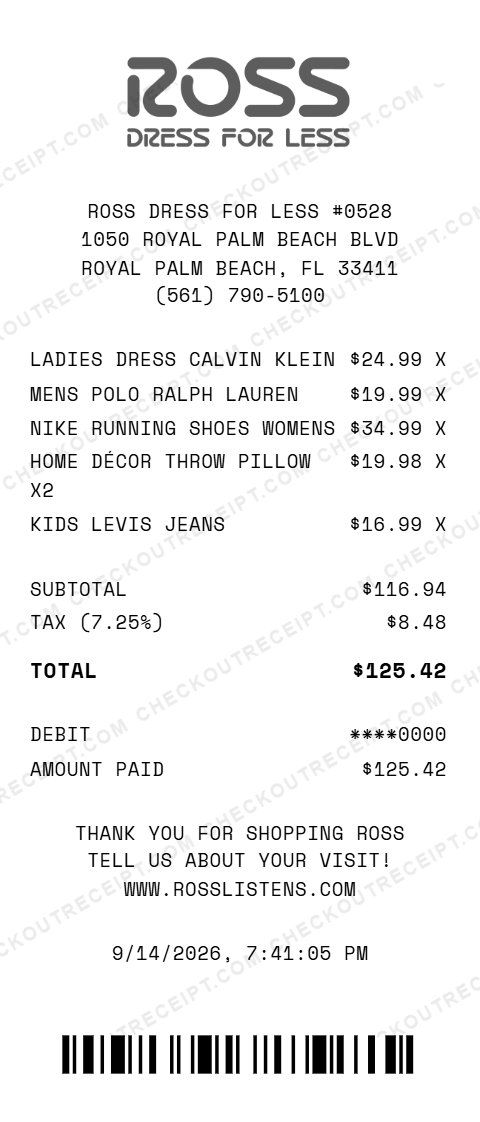
ROSS DRESS FOR LESS #0528
1050 ROYAL PALM BEACH BLVD
ROYAL PALM BEACH, FL 33411
(561) 790-5100

LADIES DRESS CALVIN KLEIN       $24.99 X
MENS POLO RALPH LAUREN          $19.99 X
NIKE RUNNING SHOES WOMENS       $34.99 X
HOME DÉCOR THROW PILLOW X2      $19.98 X
KIDS LEVIS JEANS                $16.99 X

SUBTOTAL                       $116.94
TAX (7.25%)                      $8.48
TOTAL                          $125.42

DEBIT                         ****0000
AMOUNT PAID                    $125.42
Everything You Need to Create a Realistic Ross Receipt
Our Ross receipt generator includes every detail found on authentic Ross Dress For Less receipts. Customize the store number, address, register and transaction numbers, cashier name, items with prices, tax rate, payment method, return policy text, and barcode. All formatting matches the real thermal printer output used in Ross stores nationwide.
How It Works (3 Steps, Under 2 Minutes)
Step 1: Choose the Ross Dress For Less receipt template. Step 2: Enter your store details, add items with descriptions and prices, set your tax rate, and choose a payment method. Step 3: Download your receipt as a high-resolution PNG or PDF file.
Sample Ross Receipt Items
Common items found on Ross receipts include brand-name clothing at discount prices, designer shoes, home décor, kitchenware, bedding, luggage, beauty products, accessories, and seasonal items. Ross is known for offering 20-60% off department store prices on name brands.
Tips for Creating Realistic Ross Receipts
Use ALL CAPS for item descriptions. Include the department category for each item (LADIES, MENS, KIDS, SHOES, HOME, BEAUTY, ACCESSORIES, LUGGAGE). Ross receipts always show the cashier name and register number. Add the 30-day return policy text at the bottom. Use realistic discount prices: Ross items are typically 20-60% off regular retail.
Frequently Asked Questions
How do I use this Ross Dress For Less receipt generator?
Use the editor to enter your Ross store details including store number and address, add items with descriptions and prices, set a tax rate, and choose a payment method. Click PNG or PDF to download your receipt. No account or signup is required.
What does a real Ross Dress For Less receipt look like?
A real Ross receipt includes the Ross Dress For Less logo at the top, store number and address, register and transaction details, cashier name, each item with description and price in ALL CAPS, subtotal, state sales tax, total, payment method with card details, the 30-day return policy, and a scannable barcode at the bottom.
What are the codes on a Ross receipt?
Ross receipts display the store number, register number, transaction number, and cashier ID near the top. Each item line includes an internal item code and department category such as LADIES, MENS, SHOES, HOME, or ACCESSORIES. The bottom has a return barcode number used for processing returns.
Can I customize the store location on the receipt?
Yes. You can enter any Ross store number, street address, city, state, ZIP code, and phone number. Ross operates over 1,795 stores across 43 U.S. states, so you can match any real location.
What payment methods are available on the Ross receipt template?
The template supports Visa, Mastercard, American Express, Discover, Ross Credit Card, Ross Mastercard, debit cards, and cash with change due calculation.
Does the receipt calculate tax automatically?
Yes. Select your state from the dropdown to auto-fill the base sales tax rate, or enter a custom rate. Tax is calculated in real-time on all taxable items. Note that some states exempt clothing from sales tax.
What departments appear on Ross receipts?
Common departments on Ross receipts include LADIES, MENS, KIDS, JUNIORS, SHOES, HOME DÉCOR, KITCHEN, BEDDING, BATH, BEAUTY, ACCESSORIES, LUGGAGE, JEWELRY, and SEASONAL. Each item is tagged with its department category.
Does Ross have a return policy shown on receipts?
Yes. Every Ross receipt prints the return policy at the bottom: returns accepted within 30 days of purchase with original receipt and tags attached. Items must be unused and in original condition. Returns without a receipt may receive store credit only. Our generator includes this text.
What file formats can I download the receipt in?
Receipts can be downloaded as PNG (image) or PDF (document). Both are high-resolution and suitable for printing, emailing, or uploading to expense management software.
Is this receipt generator legal to use?
This tool is designed for legitimate purposes including replacing lost receipts for actual purchases, training, design mockups, and demonstrations. Creating false receipts for fraudulent purposes is illegal and prohibited.
Last updated: September 2026
Other Receipt Templates
Check out our other receipt generators: Starbucks Receipt Generator, StockX Receipt Generator, Subway Receipt Generator, Target Receipt Generator, Tiffany & Co Receipt Generator, Walgreens Receipt Generator, Walmart Receipt Generator, Whole Foods Market Receipt Generator, Apple Store Receipt Generator, AutoZone Receipt Generator
Clothing Store Receipt Format Guide
See the full clothing store receipt format guide: every field explained, state apparel tax exemptions, and how to document Ross purchases for expense reports or returns.